Amazon Scam Text: How to Identify, Prevent & Protect Yourself



Key Takeaways
- Amazon scam texts often mimic real alerts, including order updates, delivery issues, or account notifications, making them highly convincing.
- Common tactics include fake order confirmations, phishing links, fraudulent payment requests, and impersonation of Amazon customer support.
- Falling for these scams can lead to identity theft, financial loss, malware infections, and damage to personal or business reputation.
- Recognizing suspicious sender details, verifying recent orders, and avoiding unknown links are essential to spotting scams.
- Reporting fake messages and scanning devices promptly helps minimize potential damage after exposure.
- Guardio offers proactive, real-time protection by identifying scam attempts, blocking dangerous links, monitoring exposed credentials, and guiding you to fix account vulnerabilities across all your devices.
Shopping on Amazon is designed to feel fast, easy, and secure, which is exactly why it’s a prime target for scammers. Recently, more users have reported receiving text messages that look like they’re from Amazon. These messages often reference an order shipment, failed payment, or a supposed account issue, urging you to click a link to fix the problem. On the surface, they appear legitimate - sometimes even identical to real Amazon communications.
The truth is, these scam texts are getting harder to spot. But once you know what to look for, avoiding them becomes much easier. In this guide, we’ll break down how Amazon scam texts work, the most common tactics scammers use, and the risks of clicking on them. You’ll also learn how to spot red flags, what to do if you’ve been targeted, and how tools like Guardio can help protect your accounts, devices, and personal information from evolving threats.
{{component-cta-custom}}
What is an Amazon Scam Text?
An Amazon scam text is a fraudulent message designed to impersonate Amazon and trick you into sharing sensitive information or clicking on malicious links. These texts often create a sense of urgency by claiming there's a problem with your order, a payment failure, or suspicious activity on your account.
Behind the scenes, the goal is simple: gain access to your login credentials, credit card details, or install spyware or malware on your device. While these messages can look surprisingly convincing, it’s important to remember that Amazon will never ask you to confirm sensitive information or take urgent action through unsolicited texts. Recognizing this distinction is the first step to staying safe.
Common Amazon Scam Text Tactics
Scammers use a handful of tricks that look harmless at first but are designed to grab your attention and make you act quickly. Here are the most common ones:
- Fake Order Confirmations and Shipping Alerts
You might get a text saying your Amazon order has shipped or that there’s a delivery issue. The aim is to get you to click a link to “track” or “fix” the order.
- Phishing Links Leading to Fake Amazon Logins
Some texts include links that look like Amazon’s website. Once you enter your username and password, scammers steal your account details.
Scammers also send out phishing emails saying your Prime subscription expired, hoping you’ll click the link and provide them with your credit card details. 2/3 pic.twitter.com/x1EIl5LSqK
Guardio (@GuardioSecurity) July 16, 2024
- Fraudulent Gift Card and Payment Request
Another tactic is asking you to buy Amazon gift cards or confirm payment information. These are always fake and a red flag.
Prime Day is here, and scammers don't miss a chance to cash in. Amazon scams are common year-round, but fraudsters exploit Prime Day hype with sneaky texts, emails, and calls.
Guardio (@GuardioSecurity) July 16, 2024
For example, scam texts can lead to dangerous sites aiming to steal personal and payment info. 👇1/3 pic.twitter.com/g9neyQtUTb
- Impersonation of Amazon Customer Support
Scammers may pretend to be Amazon support, warning you about account issues or suspicious activity. They use fear to trick you into sharing sensitive information.
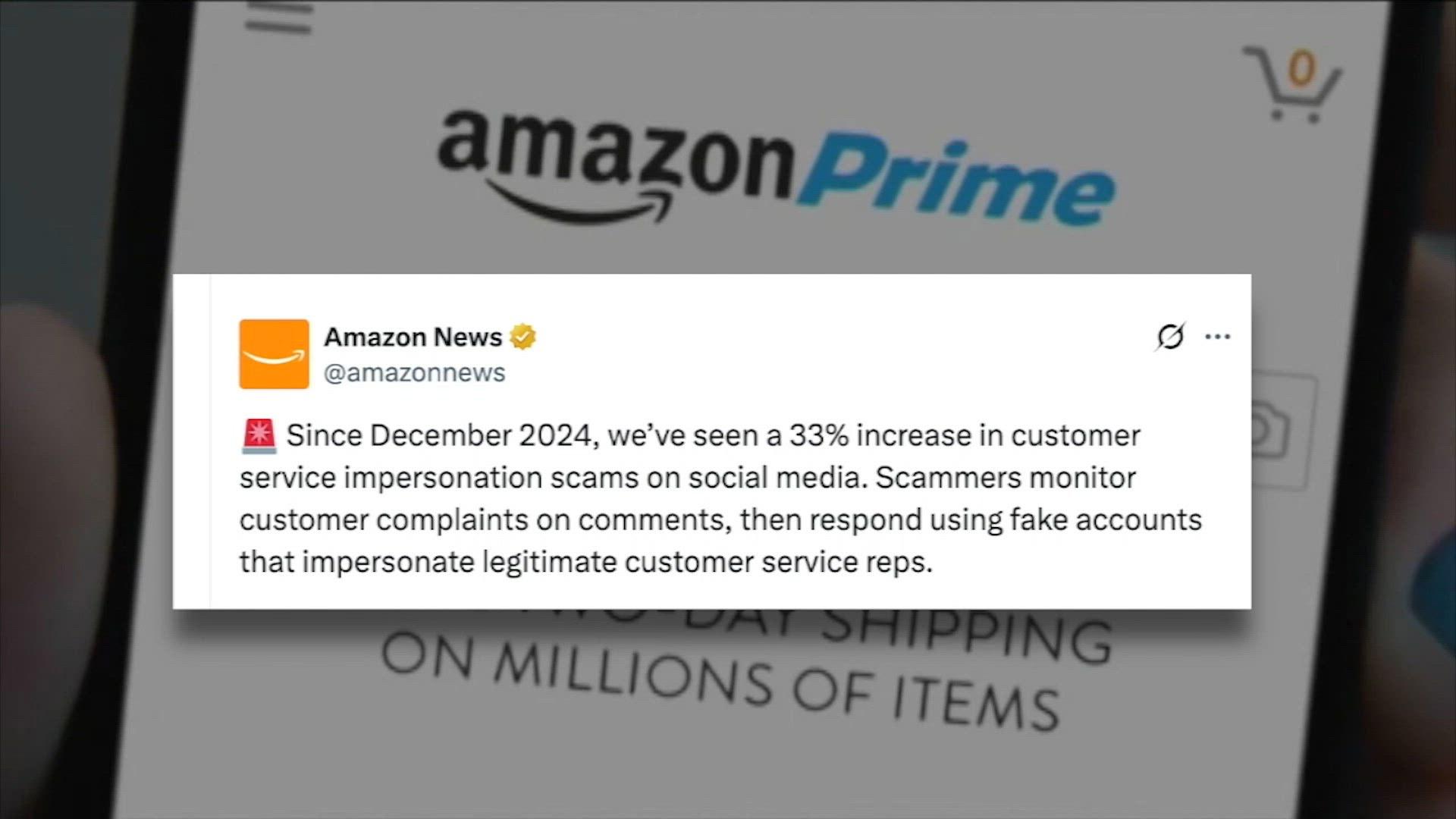
Real World Examples of Amazon Scam Texts
Here are recent real-world examples of Amazon scam texts, followed by why people fall for them and the psychology that drives the click.
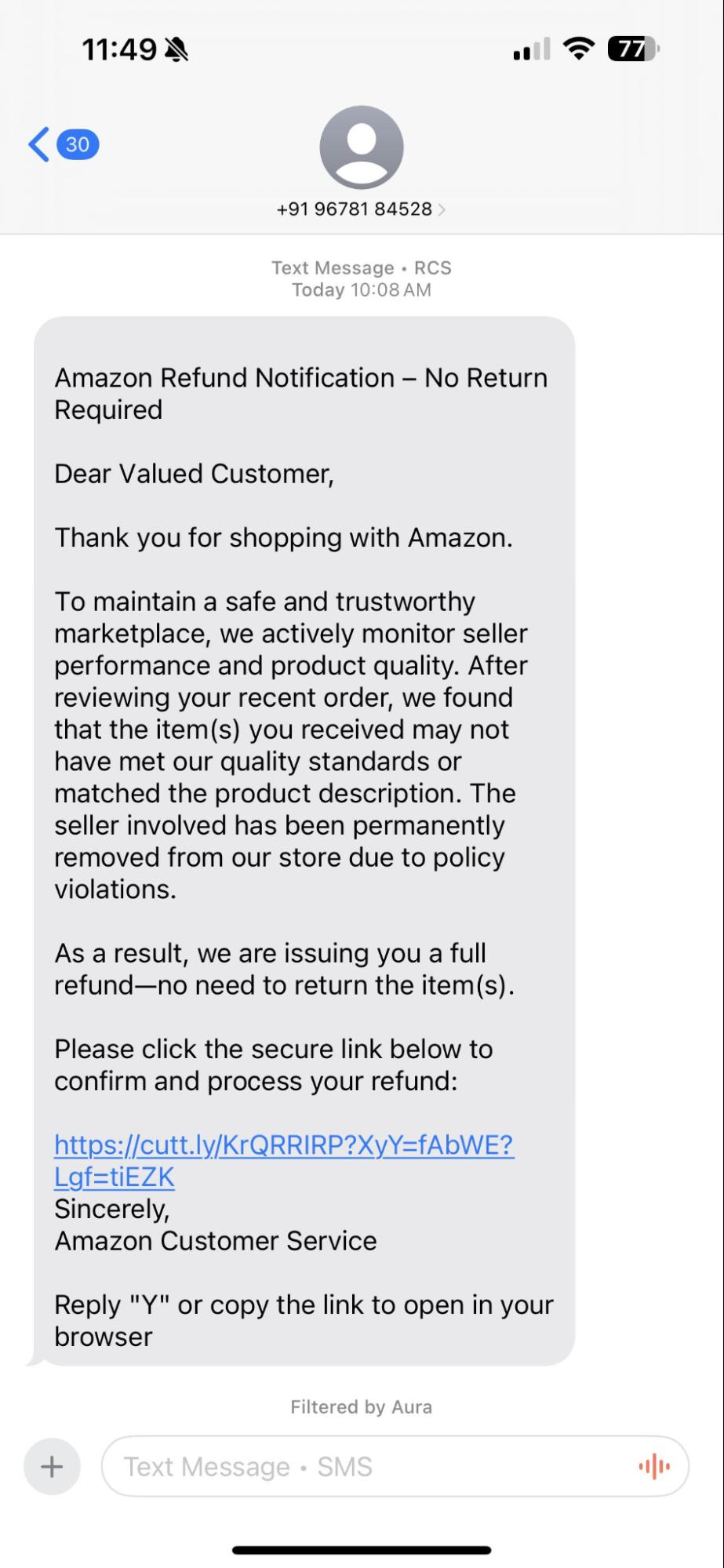
Example 1: Fake Refund Text
What The Text Says
“Due to a routine quality inspection, your recent order does not meet our safety standards. No need to return items. Click here for full refund: [some-link]”
Why People Fall for It
- It uses the idea of a recall or safety issue that feels serious and immediate.
- The text says you’ll get a full refund and don’t have to return anything, which reduces friction and makes people less suspicious.
- It uses Amazon’s brand / “inspection” language, so it feels official.
Read our guide to learn more about protecting yourself from Amazon refund scams.
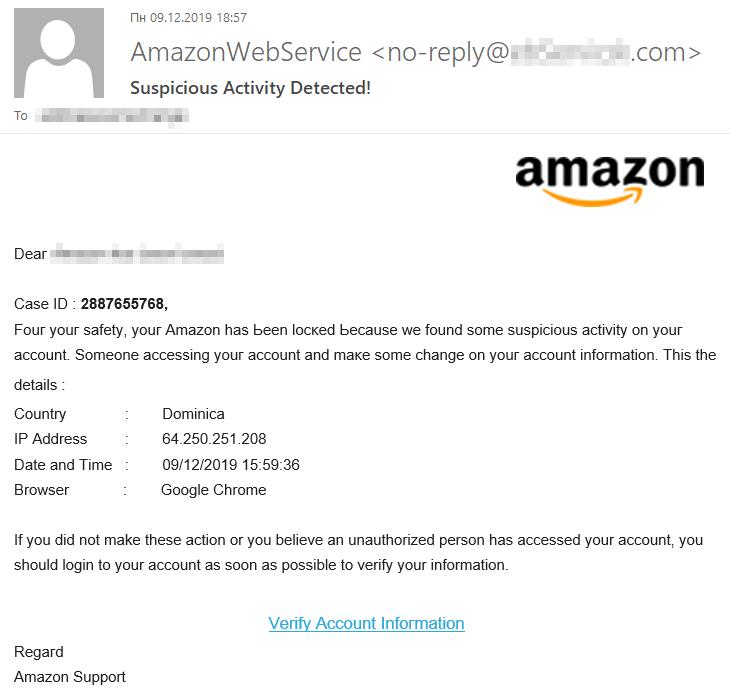
Example 2: Login Alert From “Another Location”
What The Text Says
“We saw a login to your account from Dominica. If this was not you, click here now to secure your account: [fake-login-link]”
Why People Fall for It
- It plays on the fear of someone else using your account.
- It adds personal detail (your location), which makes it feel more believable.
- It pressures you to act immediately to avoid harm (account theft).
Risks of Falling for Amazon Scam Texts
Falling for an Amazon scam text can do much more than just annoy you. Below is a quick look at the most common risks and how they can affect you.
| Risk | What It Means | Impact on You |
|---|---|---|
| Identity Theft and Account Compromise | Scammers steal your Amazon login or personal details like name, email, or address | Unauthorized access to your Amazon account and possible misuse of your identity |
| Financial Loss from Unauthorized Transactions | Stolen payment details are used for fake purchases or transfers | Direct money loss, disputed charges, and wasted time recovering funds |
| Malware and Spyware Installation Risks | Clicking links may secretly download harmful apps or trackers | Your phone or computer gets infected, leading to data theft and slower performance |
| Damage to Personal and Business Reputation | Scammers may use stolen data to target your contacts or accounts | Embarrassment, loss of trust, and reputational damage if your contacts are scammed |
How to Spot and Verify Amazon Scam Texts
Scam texts often look real at first glance, but a closer look usually reveals something is off. Here are simple checks you can use to spot a fake message before it does any harm:
Checking Sender Information and Message Authenticity
Look closely at the phone number or email address the message comes from.
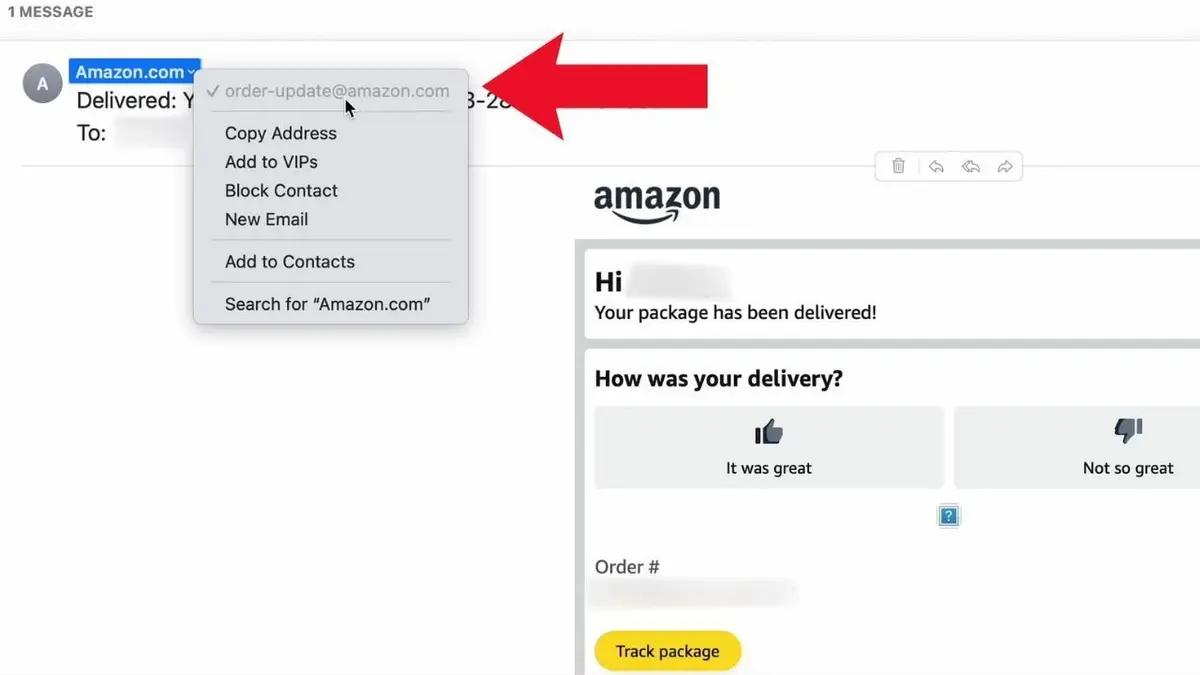
Amazon will never text you from random numbers or strange email IDs. If the sender looks suspicious, it’s almost always a scam.
Reviewing Recent Amazon Orders for Discrepancies
If a text mentions an order or delivery, log in to your Amazon account directly through the app or website. If there’s no matching order in your history, the text is fake.
Avoiding Clicks on Suspicious Links
Scam texts almost always contain links that look like Amazon but are slightly misspelled or shortened. Never tap these links. Instead, open Amazon directly from your browser or app to verify.
Reporting Fake Messages to Amazon
If you receive a scam text, forward it to 7726 (SPAM) in the US or your local spam-reporting number. You can also email it to stop-spoofing@amazon.com so Amazon can investigate and block the scammers.
What to Do After Receiving or Clicking a Scam Text
If you’ve received or clicked on a suspicious Amazon text, don’t panic. Acting quickly can reduce the damage and secure your accounts. Follow these steps in order:
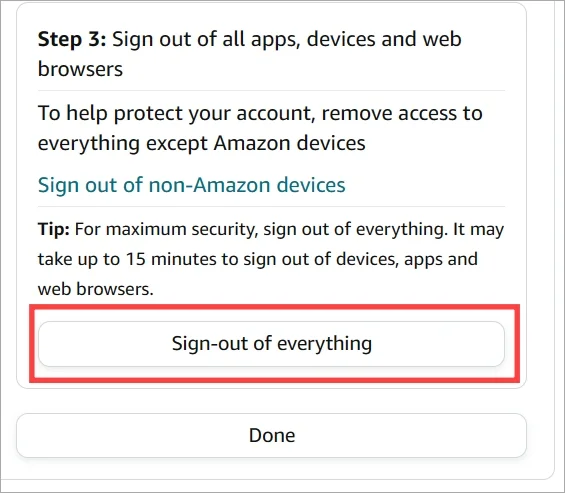
Step 1: Immediate Account Security Measures
Log in to your Amazon account directly from the app or website. If you still have access, sign out of all devices and review your recent orders and payment history for anything unusual.
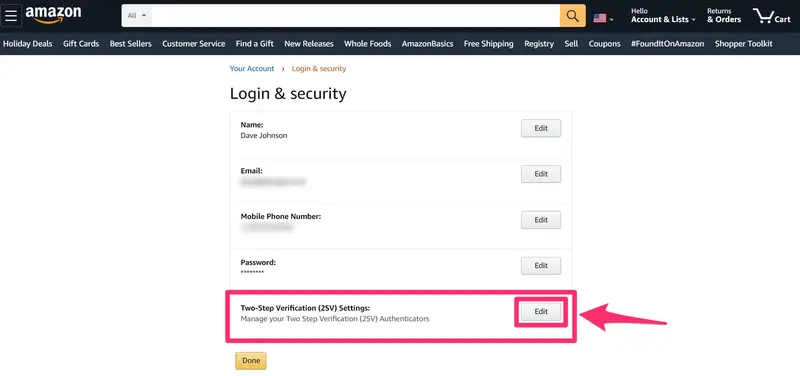
Step 2: Changing Passwords and Enabling Two-Factor Authentication
Update your Amazon password right away, making sure it’s strong and unique. Turn on two-factor authentication so even if scammers have your password, they can’t log in without the extra code.
Step 3: Reporting Scams to Amazon and Authorities
Forward the fake text to stop-spoofing@amazon.com and report it to your mobile carrier by sending it to 7726 (SPAM). If you lost money, file a complaint with your local cybercrime authority or consumer protection agency.
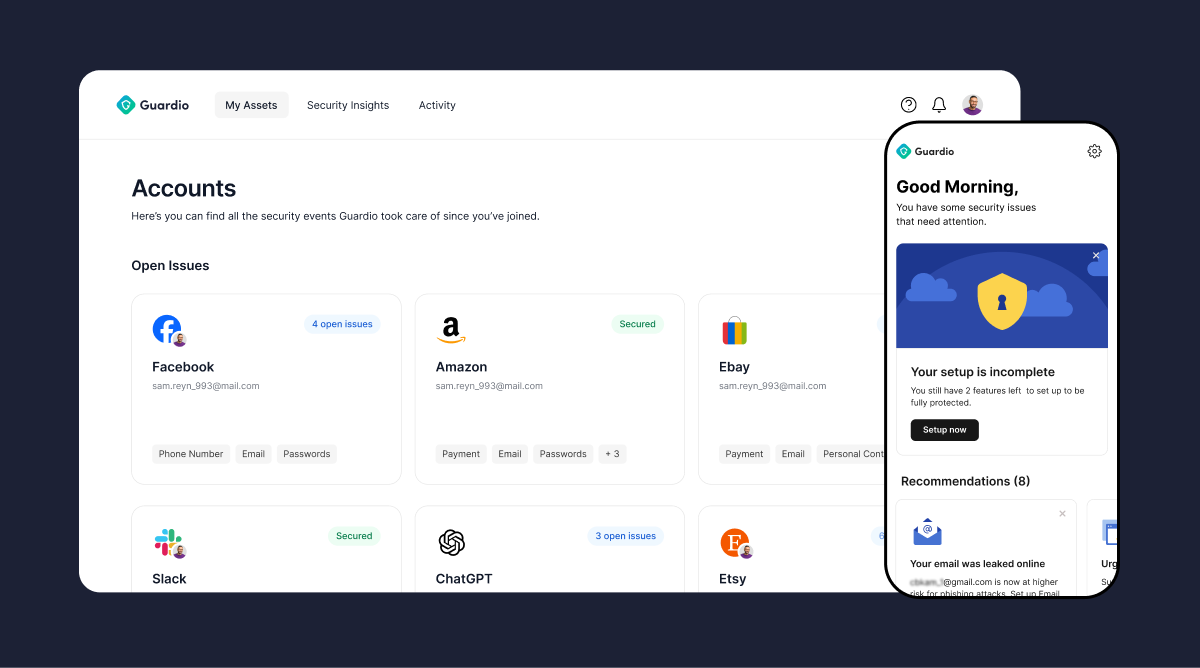
Step 4: Scan for Threats, Leaks, and Vulnerabilities
Run a full device scan using a trusted security tool like Guardio that checks for malware, suspicious activity, leaked credentials, and exposed account data, helping you detect vulnerabilities before they can be exploited. Once the scan is complete, review any alerts and remove identified threats immediately. To stay protected going forward, make sure proactive protection is installed and running. This keeps new attacks from slipping through and gives you real-time alerts if something goes wrong.
{{component-tips}}
What to Do If You Clicked a Scam Link
If you accidentally clicked a link in an Amazon scam, quick action can help limit the damage. Here’s what to do right away:
- Run a Security Scan Using Trusted Tools
Use a reliable antivirus or mobile security app to scan your device. Remove any malware, spyware, or suspicious files it finds.
- Reset Critical Account Passwords
Change your Amazon password first, then update passwords for your email and banking accounts. Use unique and strong passwords for each.
- Monitor for Identity Theft and Data Leaks
Keep an eye on your bank statements, credit card bills, and emails for signs of fraud. If something looks off, report it immediately.
- Use Guardio to Check for Leaked Credentials
Guardio continuously monitors the web for exposed emails, passwords, and account data tied to your identity, alerting you if your credentials are found in a data breach so you can act fast. Guardio also highlights important account settings that may need updating, such as:
- Two-Factor Authentication (2FA): Adds an extra verification step beyond your password.
- Password Updates: Replacing weak or reused passwords with stronger, unique ones.
Best Practices for Preventing Amazon Scam Texts
Stopping Amazon scam texts before they reach you is easier than fixing the damage afterward. Here are some easy habits and precautions you can follow to keep your accounts and devices safe:
| Best Practice | Why It Matters |
|---|---|
| Using Strong and Unique Passwords | Makes it harder for scammers to guess or steal your account login |
| Keeping Devices and Apps Updated | Updates patch security vulnerabilities that scammers could exploit |
| Being Cautious with Public Wi-Fi and Links | Public networks and unknown links can be used to intercept your data or install malware |
| Educating Family and Employees About Scam Awareness | Teaching others helps prevent accidental clicks and reduces the risk of spreading scams |
How Guardio Protects Against Amazon Scam Texts
Guardio defends your digital life by proactively identifying threats, securing accounts, and flagging suspicious behavior, before scammers can do damage. Here’s how it helps:
- Detects Scam Messages Across SMS, Email, and Web Activity
Guardio spots phishing attempts that mimic Amazon texts, login alerts, or refund notices, even if attackers use generative AI to sound legitimate.
- Blocks Malicious Links Across All Devices
When a dangerous link appears in a message or online, Guardio blocks access in real time, preventing stolen credentials or malware downloads.
- Real-Time Alerts That Let You Act Fast
Get instant warnings when Guardio spots signs of suspicious login attempts, phishing URLs, or data breaches affecting your accounts.
- Personalized Security Recommendations
Guardio scans your digital footprint and highlights weak spots, like reused passwords or missing 2FA, helping you fix them before attackers strike.
- Unified Protection Beyond the Browser
Guardio works across your entire online identity, giving you control over your data, accounts, and security from one dashboard.
- Breach Monitoring for Compromised Accounts
If your Amazon login or email is found in a data breach, Guardio alerts you instantly, so you can lock things down before scammers exploit it.
Conclusion
Amazon scam texts are evolving fast, becoming more personalized, more urgent, and harder to spot at first glance. But with the right habits and security mindset, they’re entirely avoidable. Always verify unexpected messages, steer clear of unfamiliar links, and take immediate action if something doesn’t feel right.
Security tools like Guardio add an essential layer of proactive protection, flagging scam attempts, blocking malicious sites, and alerting you if your personal data has been exposed. By combining awareness with smart security practices and trusted tools, you can stay ahead of scammers and shop with confidence. Stay sharp, stay protected, and don’t let fraudsters take control of your online experience.
{{component-cta-custom}}
FAQs