Facebook Marketplace Payment Scam 2026: How It Works and How to Avoid It



Key Takeaways
- Screenshots are not proof: Payment confirmations can be faked in minutes. Only your own app balance counts.
- Shipping before payment clears is the #1 loss: Once the item leaves your hands, your leverage is gone.
- Off-platform payments remove your protection: Marketplace cannot help if you paid outside their system.
- Urgency is manufactured: "Someone else is interested" is designed to make you skip verification.
- The scam is in the proof standard: Scammers want you to accept their evidence instead of your own.
If someone pushes a Marketplace deal off-platform or asks you to "confirm payment" via a link, stop. Verify payments in your own app and only ship after funds are fully available.
{{component-cta-custom}}
Why Marketplace Scams Feel Like Normal Transactions
Facebook Marketplace is informal by design. There is no checkout flow, no standardized payment, and no automatic escrow. That informality is exactly what scammers exploit.
In a legitimate transaction, you control the proof: you see the money in your account, you hand over the item. In a scam, they control the proof: they show you a screenshot, a link, a "confirmation" that exists only on their end.
The Psychology of Marketplace Scams
- Social proof pressure: "I have three other people interested" creates FOMO and rushes your decision.
- Authority through detail: Fake payment confirmations include transaction IDs, timestamps, and bank logos to look official.
- Reciprocity trap: They send a deposit or "overpay," creating a sense that you owe them something.
- Shipping urgency: "I need it shipped today for my daughter's birthday" appeals to your helpfulness.
- Platform confusion: They claim Marketplace "requires" certain steps that actually move you off-platform.
Real Marketplace Scam Scripts (And Why People Fall for Them)
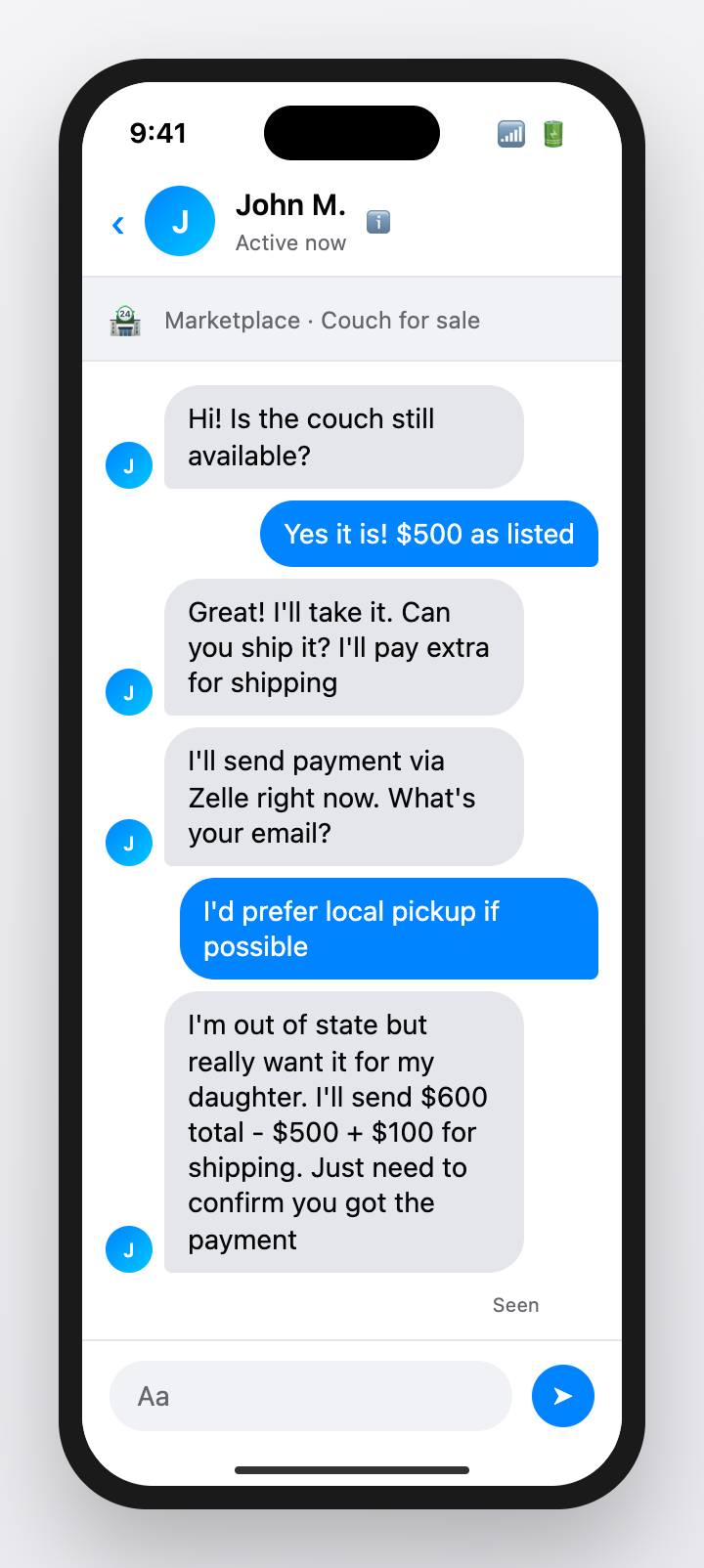
Scam 1: The Fake Payment Confirmation (Targeting Sellers)
How it works:
- Buyer expresses interest and agrees to your price quickly (no negotiation is a yellow flag)
- They say they will pay via Zelle, Venmo, or bank transfer
- You receive an email or text that looks like a payment confirmation
- They pressure you to ship immediately because they "need it urgently"
- The confirmation is fake. No money was ever sent.
Why people fall for it:
- The confirmation email looks legitimate with logos and transaction details
- They may have your email address and send it directly to you
- The urgency makes you want to help
- You trust that if they have a confirmation, the money is coming
Safe response: Open your bank or payment app. If the money is not there and available, it was not sent. Never trust screenshots or emails as proof.
Scam 2: The Overpayment and Refund (Targeting Sellers)
How it works:
- Buyer sends a check for more than the asking price (e.g., $800 for a $500 item)
- They claim it was a mistake or that the extra is for "shipping" or a "mover"
- They ask you to refund the difference via Zelle, Venmo, or gift cards
- You send the refund. Days later, the original check bounces.
- You are out both the item AND the "refund" you sent.

Why people fall for it:
- The check may actually deposit initially (banks make funds available before checks fully clear)
- You feel obligated to return the "overpayment"
- The buyer is friendly and apologetic about the "mistake"
- The refund request seems like a reasonable solution
Safe response: Never accept checks for Marketplace items. If you do, wait 2+ weeks for the check to fully clear before spending any of it. Never refund via a different payment method.
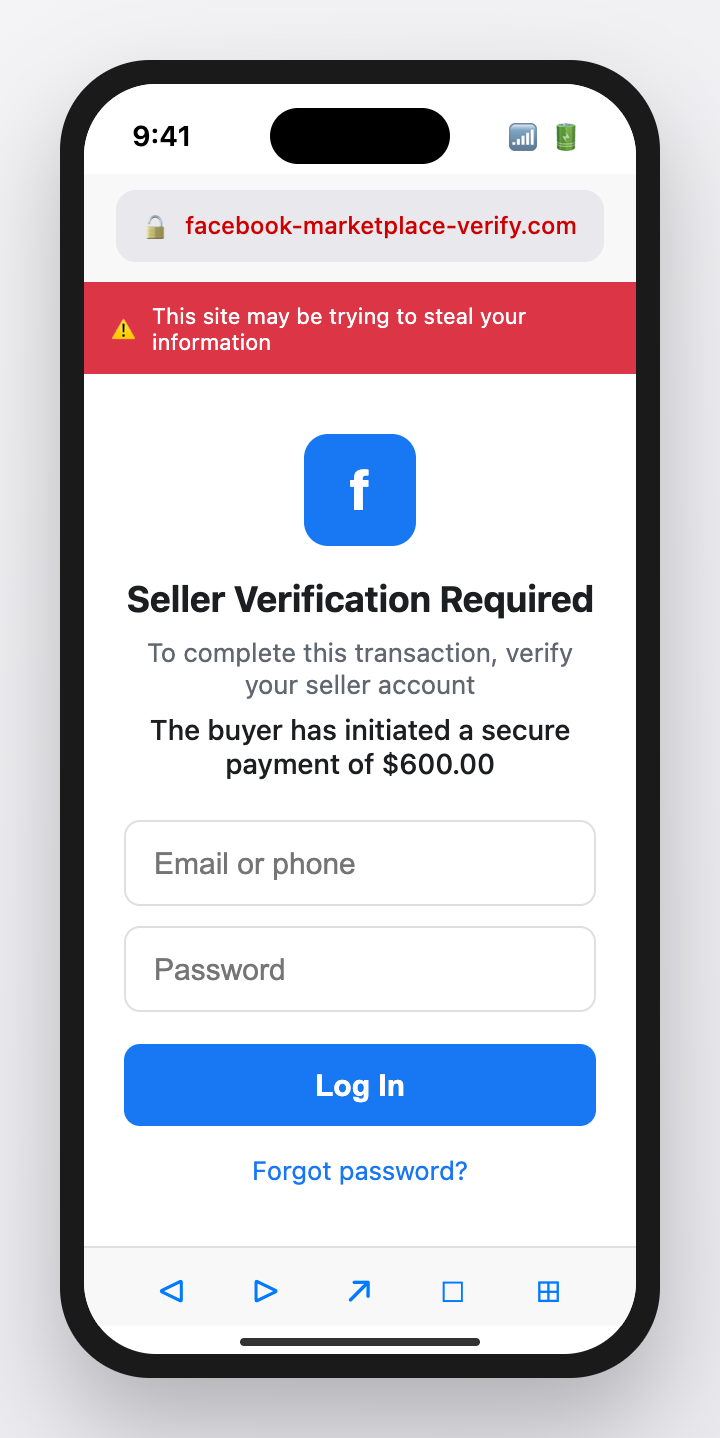
Scam 3: The Fake Buyer Protection Link (Targeting Sellers)
How it works:
- Buyer agrees to your price and says they will pay through "Meta Pay" or "Marketplace Protection"
- They send a link to "verify the transaction" or "confirm your seller account"
- The link goes to a fake page that looks like Facebook or a payment processor
- You enter your login credentials or payment details
- They now have your account or card information
Why people fall for it:
- The page looks exactly like Facebook or a legitimate payment site
- "Seller verification" sounds like a reasonable security step
- You want the sale to go through
- The buyer seems to know how the platform works
Safe response: Never click links from buyers. There is no "seller verification" step. If Facebook needs anything from you, it will be in your actual Facebook notifications.
Scam 4: The Shipping Trap (Targeting Buyers)
How it works:
- Seller lists an item at a great price
- They say they cannot meet in person - you must pay for shipping
- They ask for payment via Zelle, Venmo, or gift cards
- You pay. The item never arrives. The seller disappears.
Why people fall for it:
- The price is attractive
- Shipping seems like a reasonable accommodation
- Zelle and Venmo are normal payment methods
- The seller's profile may look legitimate
Safe response: For valuable items, insist on local pickup with payment at handoff. If you must ship, use PayPal Goods & Services or another method with buyer protection.
Payment Method Risk Comparison for Marketplace
| Payment Method | Buyer Protection | Seller Protection | Scam Risk |
|---|---|---|---|
| Cash at pickup | None - verify bills | Full - money in hand | Low (if you meet safely) |
| Meta Pay checkout | Strong - Purchase Protection | Good - payment guaranteed | Low |
| Credit card (if available) | Strong - can dispute | Good - hard to reverse | Low |
| PayPal Goods & Services | Good - buyer protection | Moderate - seller can be scammed too | Low-Medium |
| Venmo (purchase protection) | Some protection | Some protection | Medium |
| Zelle | Almost none | Good for seller | High for buyers |
| Venmo/Cash App Friends & Family | None | Good for seller | High for buyers |
| Personal check | None after it clears | None - can bounce | Very High |
| Gift cards | None | None | Extreme |
Red Flags in Marketplace Transactions
| Red Flag | What It Usually Means |
|---|---|
| Agrees to price instantly without negotiation | Not focused on the item - focused on the scam |
| Cannot meet in person for any reason | Wants to avoid being identified |
| Sends payment "confirmation" via screenshot or email | Fake payment - verify in your own app |
| Asks you to click a link to verify anything | Phishing attempt |
| Overpays and asks for refund of difference | Check will bounce |
| Pressures you to ship immediately | Wants item before you realize payment is fake |
| Wants to pay with gift cards | Untraceable, irreversible payment |
| Account is new or has no marketplace history | Possibly created for scam |
What to Do If You Have Been Scammed
If You Shipped Before Payment Cleared
- Contact the shipping carrier immediately - you may be able to intercept the package
- Document everything: screenshots of conversations, payment confirmations, tracking info
- Report the buyer to Facebook through the listing
- Report to your local police if the value is significant
- Report to FTC at ReportFraud.ftc.gov
If You Sent Money and Got Nothing
- Contact your payment provider immediately
- For credit cards: dispute the charge
- For PayPal Goods & Services: open a dispute
- For Zelle/Venmo: contact them, but recovery is unlikely
- Report the seller to Facebook
- File a police report for significant amounts
If You Entered Credentials on a Fake Page
- Change your Facebook password immediately
- Enable two-factor authentication
- Check for unauthorized posts, messages, or purchases
- If you entered payment details, contact your card issuer
- Review your Facebook login history and remove unknown devices
{{component-tips}}
How Guardio Protects You on Marketplace
Marketplace scams increasingly use phishing links disguised as payment confirmations or verification pages. Guardio provides protection at the moment you click:
- Fake payment page detection: When someone sends you a link to "confirm payment" or "verify your account," Guardio analyzes the destination. Lookalike pages are blocked before you can enter any information.
- Messenger link scanning: Scam links often arrive through Facebook Messenger. Guardio scans these links in real time.
- Domain impersonation alerts: Domains like "facebook-marketplace-verify.com" or "zelle-payment-confirm.net" are flagged immediately.
- Cross-platform protection: Whether you are browsing Marketplace on your phone or computer, Guardio works across devices.
{{component-cta-custom}}
Report Marketplace Scams
- Report the listing and seller profile within Facebook Marketplace
- FTC: ReportFraud.ftc.gov
- BBB Scam Tracker
- Your local police department for significant losses
Sources
FAQs
How do sellers get scammed on Marketplace?
Common tactics include fake payment screenshots and requests to ship before payment is verified. Always verify in your own app.
Is it safe to accept payment screenshots?
No. Screenshots can be faked. Verify transfers in your own banking or payment app.
Should I click a link to confirm a payment?
No. Open the official app or website directly and verify there.
What is the safest pickup approach?
Meet in a safe public place and confirm payment fully before handing over the item.
What if I already paid and the seller vanished?
Contact your payment provider quickly, document everything, and report the profile.
How can Guardio help?
Guardio can warn you about suspicious links and lookalike pages that try to steal logins or payment details.