How to Check If a Link Is Safe in 2026 and Avoid Online Scams



Key Takeaways
- Unsafe links are now one of the most common scam entry points: Phishing, malware, and fake websites often start with a single click that looks harmless.
- Visual checks alone aren’t reliable anymore: Modern scam pages use AI, clean designs, and brand impersonation to appear legitimate.
- Knowing where links appear helps reduce risk: Emails, messages, ads, search results, and social media are the most common delivery channels.
- Manual link checks help but have limits: Scam sites change quickly and often disappear before reputation databases catch up.
- Guardio adds proactive protection: Guardio helps block unsafe links, detect scam pages in real time, and alert users before threats turn into real damage.
Clicking a link feels harmless. You do it dozens of times a day when opening emails, checking messages, scanning search results, or tapping on social media posts. But in 2026, links have become one of the most common ways scammers, hackers, and fraudsters reach people online.
The tricky part is that unsafe links don’t always look suspicious anymore. Scam pages now copy real brands perfectly with the help of the latest AI development tools, use clean designs, and even show “secure” HTTPS labels. Many are created and taken down within hours, which means traditional warning signs don’t always apply.
That’s why knowing how to check if a link is safe matters more than ever. This guide breaks it down in simple terms: what unsafe links look like, where they appear, how to verify them without clicking, and what to do if you have already clicked.
{{component-cta-custom}}
Why Link Safety and Reputation Matter
Every unsafe link has one thing in common that it’s designed to make you click before you think. Link safety and reputation help you pause that moment and understand whether a URL is trustworthy or risky before any damage happens.
Risks From Clicking Unsafe URLs (Phishing, Malware, Scams)
Unsafe links are often the entry point for most online scams. When you click one, several things can happen in seconds:
- Phishing pages may ask you to log in, pretending to be a real service like email, banking, or shopping sites.
- Malware downloads can start silently, infecting your device without an obvious warning.
- Scam checkouts or fake offers may push you to enter payment details or personal information.
What makes this dangerous is how normal these links look. Many scams now use clean layouts, familiar branding, and realistic language. By the time something feels “off,” the damage may already be done.
How Unsafe Links Lead to Account and Identity Compromise
Clicking an unsafe link doesn’t just affect one account. It can trigger a chain reaction. If scammers steal your login details, they may access your email or social accounts, reset passwords elsewhere, or impersonate you to scam others.
🚨 Watch out for scam texts claiming you have a pending charge.
Guardio (@GuardioSecurity) April 14, 2025
They’re sent to create a false sense of urgency and lead you to phishing sites that look just like real bank or credit union login pages.
If you click and enter your credentials, scammers can gain access to your… pic.twitter.com/77r3CqzWst
In more serious cases, stolen information is reused for identity fraud, fake loans, or account takeovers across multiple platforms. This is why a single careless click can lead to weeks or months of cleanup.
How Reputation Signals Help Identify Risky Links
Link reputation is essentially a trust score built from past behavior. Security systems look at signals such as:
- Has this domain been linked to scams or phishing before?
- Is the website newly created or frequently changing locations?
- Do many users report it as suspicious or unsafe?
These reputation signals help flag risky links early, even when they look legitimate on the surface. While no system is perfect, reputation-based checks add an important layer of protection, especially against fast-moving scams that rely on speed and volume to succeed.
Understanding link reputation helps you make safer decisions online and avoid falling for threats designed to look “just real enough.”
Signs a Link Is Unsafe Before You Click
Most unsafe links give off small warning signs before you ever open them. The problem is that these signs are easy to miss when you’re distracted, in a hurry, or trusting the sender. Learning to spot them early can save you from scams, malware, and account takeovers.
- Misspelled domains and lookalike URLs that copy real brands using small spelling changes or extra words.
- Unexpected urgency or threatening language pushing you to act immediately or a warning of account suspension.
- Suspicious shortened or redirected links that hide the real destination or pass through multiple pages.
- Links that don’t match the sender or context, such as unexpected deliveries, documents, or login requests.
Where Unsafe Links Most Commonly Appear
Most people don’t click unsafe links because they’re careless. They click them because the link appears exactly where it feels normal.
| Channel | What the Link Usually Looks Like | Why It’s Risky |
|---|---|---|
| Emails and Calendar Invites | Password resets, invoices, shared documents, meeting updates | Attackers copy real companies and use urgency to get clicks before you verify |
| Text Messages and Messaging Apps | Delivery alerts, bank warnings, missed call or refund messages | Short messages limit context and make fake links feel more believable |
| Search Results and Sponsored Ads | “Official” login pages, customer support sites, discount offers | Scam sites can appear in ads or SEO results before being taken down |
| Social Media Posts, Comments, and DMs | Giveaways, trending news, account warnings, shortened links | Scammers rely on trust, curiosity, and fast sharing to spread links quickly |
Common Threats Behind Unsafe Links
Unsafe links are rarely accidental. Most are carefully designed to deliver a specific type of attack the moment someone clicks. While some aim to steal information directly, others work quietly in the background, making them harder to notice until real damage is done.
Phishing Pages and Credential Harvesting
Phishing links usually lead to fake websites that closely imitate real login pages for email providers, banks, or popular online services. These pages often look legitimate, using familiar logos, layouts, and even secure-looking URLs.

When a user enters their login details, the information is captured and sent to attackers instead of the real company. Stolen credentials are then used to take over accounts, reset passwords on other services, or impersonate the victim to scam others.
Malware and Ransomware Delivery
Some unsafe links are designed to infect devices rather than collect information. After clicking, users may unknowingly download malicious files disguised as invoices, updates, or shared documents.
What is malvertising? Malvertising = malicious ads designed to trick you into clicking. These ads redirect you to phishing sites or install malware, putting sensitive data like your PayPal credentials at risk.
Guardio (@GuardioSecurity) January 13, 2025
In other cases, malware installs silently in the background. This can lead to spyware monitoring activity, data being stolen, or ransomware locking files and demanding payment. These attacks often go unnoticed at first, giving attackers time to cause more damage.
Ad-Based Redirects and Drive-By Downloads
Ad-based attacks use redirection to hide malicious activity. A link or ad may initially appear harmless, but clicking it sends users through multiple hidden pages before landing on a dangerous destination. During this process, malicious scripts can load automatically without any clear action from the user.
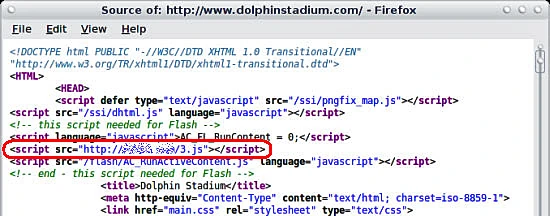
These drive-by attacks are especially risky because they don’t rely on downloads or warnings, making them harder to detect and easier to overlook.
Steps to Scan a URL Without Clicking
Before opening any suspicious link, it’s safer to inspect it without visiting the website directly. These steps help you understand where a link leads and whether it has been flagged as dangerous without putting your device or accounts at risk.
- Copy and paste the link into a URL scanner: This lets you analyze the destination safely without opening the site or exposing your device to hidden threats.
- Check for phishing or malware warnings: Look for alerts that indicate the link is associated with fake login pages, malicious downloads, or scam activity.
- Review reputation results across multiple tools: Comparing results helps catch newly created scam sites that may not yet appear in a single database.
- Expand and verify shortened links: Revealing the full URL helps you confirm whether the link leads to a legitimate website or a deceptive lookalike domain.
- If you want an automatic safety check, tools like Guardio can warn you before a risky destination opens across web, email, and text links.
{{component-tips}}
Browser and Device Safety Features to Use
Your browser and device already have built-in tools designed to warn you about unsafe links if you know where to look and how to use them.
| Safety Feature | What It Does | Why It Matters |
|---|---|---|
| Built-in Phishing and Unsafe Website Warnings | Displays alerts before loading sites linked to scams, phishing, or malware | Stops dangerous links before any interaction happens |
| Security and Privacy Settings | Uses safe browsing, tracking protection, and automatic updates | Helps detect newer threats and reduces exposure to risky behavior |
| Pop-Up and Redirect Blocking | Prevents unexpected windows and forced page redirects | Limits drive-by downloads and misleading scam prompts |
Why Manual Link Checks Aren’t Enough Anymore
Checking links manually used to be a reliable way to stay safe online. Today, it’s often not enough. Scammers now move faster, use better tools, and rely on automation, making it harder for users to spot danger before a link does real damage.
Scam Pages Change Faster Than Reputation Databases
Many scam websites are created, used, and taken down within hours. By the time a link is reported and added to a reputation database, the attackers have already moved on to a new domain. This makes manual checks less reliable, especially when links are fresh, short-lived, or shared at scale.
AI-Generated Phishing Looks Legitimate
Modern phishing pages are no longer sloppy or obvious. Attackers use AI to generate clean layouts, realistic language, and even personalized messages.
🚨Tech support scams aren’t going anywhere.
Guardio (@GuardioSecurity) May 29, 2025
They’ve more than doubled so far in 2025 - up 137% since November.
Scammers are now using AI to create ultra-convincing pop-ups, fake alerts, and support calls at scale 🧵 pic.twitter.com/d9qlPwZ5Zf
These pages often look identical to real websites, making visual inspection alone a weak defense even for careful users.
Most Attacks Succeed Before Users Can React
Link-based attacks are designed to work quickly. A single click can trigger credential theft, redirects, or background downloads in seconds. By the time a user realizes something is wrong, sensitive information may already be exposed or malware installed.
That’s why always-on protection matters, especially across mobile and desktop, where most links are clicked in the moment.
What to Do If You Click a Malicious Link
Clicking a malicious link doesn’t automatically mean everything is lost. What matters most is how quickly and calmly you respond. Acting fast can limit the damage and prevent a small mistake from turning into a larger security issue.
- Close the page and disconnect immediately: Exit the page right away without clicking anything else, and disconnect from the internet to stop further background activity or downloads.
- Run security checks and scans: Use trusted security tools to scan your device for malware or spyware, even if nothing obvious happened.
- Change passwords and secure affected accounts: Update any passwords you entered or accounts connected to the device, enable two-factor authentication, and watch for unusual login activity.
- Check for exposure signals: Check for exposure signals such as breach alerts, risky account settings, and lock down the accounts that could be affected.
How Guardio Protects You From Unsafe Links
Guardio helps you confirm whether a URL is safe before a risky click turns into stolen credentials, scam payments, or account compromise. It’s built for modern link threats that show up across search results, ads, email, and text messages - and not just one channel.
- Proactively warns and blocks risky destinations: Guardio checks links in real time and blocks access to known scam sites, phishing pages, and malicious destinations before they load, reducing the chance of accidental clicks causing harm.
- Detects scam pages and brand impersonation in real time: Many modern scams closely copy trusted brands, making them difficult to spot by appearance alone. Guardio looks for lookalike domains, fake login flows, and deceptive page behavior to identify impersonation attempts that often slip past visual checks.
- Alerts users to suspicious links and unsafe behavior: When something doesn’t look right such as unexpected redirects, misleading prompts, or risky link behavior, then Guardio alerts you immediately. These timely warnings help you pause and reassess before entering personal information or continuing further.
- Provides cross-device protection across browsing and online activity: Links don’t only appear on one device or platform. Guardio helps protect users across everyday browsing, emails, messages, ads, and social platforms, creating a consistent safety net wherever links show up.
Rather than reacting after damage is done, Guardio focuses on preventing unsafe links from becoming a problem in the first place.
Conclusion
Checking links carefully is still important, but in 2026, it’s no longer enough on its own. Scam pages change quickly, phishing looks more convincing than ever, and attacks often succeed before users have time to react.
Having Guardio adds protection. By combining smart habits with proactive, real-time defense, you’re far better equipped to avoid scams, protect your accounts, and browse with confidence even as online threats continue to evolve.
{{component-cta-custom}}
FAQs
How can I tell if a shortened link is dangerous before clicking?
You can preview shortened links using URL expanders or security scanners without opening them.
- Use a URL expander like CheckShortURL or Unshorten.It to reveal the full link.
- Paste the full URL into a scanner like VirusTotal to check its reputation.
- Check for unusual domains that mimic real brands using extra letters or symbols.
- Avoid clicking on shortened links in messages from unknown contacts.
For ongoing protection, Guardio reveals and scans all linksincluding shortened onesin real time. Learn how Guardio protects against phishing links.
Are link scanner websites safe to use?
Most are, but not all offer real-time protection or cover newer scam sites.
- Stick to trusted scanners like VirusTotal, Google Safe Browsing, and URLVoid.
- Don’t rely on a single sourcecross-check results from multiple tools.
- Avoid scanners that ask for personal info or make you sign in.
- Install Guardio to automate these checks and get alerts without pasting links manually.
Guardio uses live data and machine learning to flag threats earlier than static tools. See how it works.
Can scammers send malicious links through Google search?
Yesscammers buy ads or manipulate SEO to make fake links look official in search results.
- Look for “Ad” labels next to results; ads can be disguised scams.
- Hover before clicking to inspect the URL and spot impersonation.
- Use an extension like Guardio to automatically flag scammy search results.
- Be cautious with support numbers or login pages found via search.
Guardio protects your search results in real time, even blocking fake support pages. Learn how Guardio handles search hijackers.
Does Guardio block phishing pages that look real?
YesGuardio detects phishing even if the site looks like a perfect clone.
- Blocks fake login pages for services like Google, banks, and email.
- Uses AI and behavioral signals to detect fakes, not just bad URLs.
- Alerts you before the page loads, reducing the risk of stolen credentials.
- Works across Chrome, Edge, and mobile apps, covering links from any source.
If you want to see examples of blocked sites, visit your Browsing Protection log.
How can I see which links Guardio blocked on my devices?
You can view blocked URLs on both desktop and mobile through your dashboard or app.
- On the desktop, go to the Browsing page and click the eye icon to unhide URLs.
- On mobile, open the Guardio app, tap “Browsing Protection,” and expand the blocked site list.
- Blocked links are shown per device, so check both if needed.
- If needed, you can allow a blocked link, but only if you're sure it's safe.
Learn more about how to manage blocked and allowed sites.

 Phishing Scams
U.S. Trademark and Patent Owners Targeted in New Scam