

Cyrillic Scams & Homograph Attacks: How to Stay Safe Online



Key Takeaways
- Scammers use lookalike letters to trick you: Homograph attacks swap Latin letters with similar-looking Cyrillic ones (like “а” instead of “a”) to create fake links that seem legit at first glance.
- These fake sites can steal your info: Clicking on one of these links can lead to fake websites or trigger downloads of malware designed to steal passwords or personal data.
- It’s super easy to fall for them: Even experienced internet users can get fooled because the fake URLs look almost identical to real ones.
- Simple habits can keep you safe: Always hover over links to inspect them, use strong passwords, enable multi-factor authentication, and double-check URLs for odd characters.
- Tools can do the heavy lifting: Using security software that flags fake links and malicious sites can catch these scams before you do.
What if you got an email from your bank saying there's a problem with your account, and all you need to do to fix it is click this link: http://citibаnk.com? The email looks legit, complete with your bank's logos—but you're no rookie. You've been reading this blog for a while, so you know things aren't always as they seem. You hover over the URL, and it looks totally legit... But here's the kicker—scammers are using Cyrillic letters to disguise fake websites. Something that an untrained eye wouldn’t notice, detect, and totally fall for it.
But hold up, what's Cyrillic, and what are these scams all about? Glad you asked because, in this article, we'll break down exactly what Cyrillic scams are and how to spot them. As an added bonus, we'll show you how having Guardio by your side can protect you, even if you do end up clicking that sketchy link. Ready? Let's get this party started!
{{component-cta-custom}}
What is a Homograph Attack in Cyber Security?
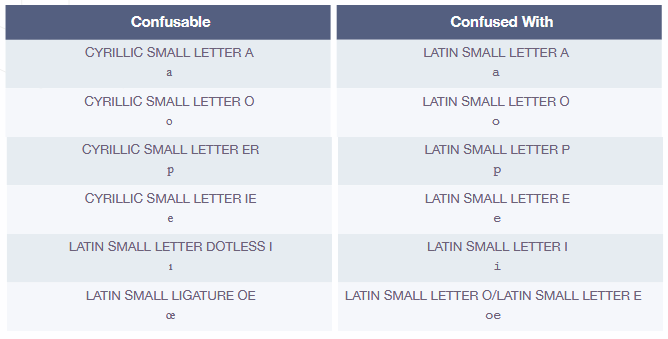
Well, a homograph is like a master of disguise in the world of letters. The term “homograph” refers to characters that look so similar to each other that the average user can't tell them apart at a glance. In simple terms, it’s a character that looks exactly like another one but means something totally different. Think of it as a letter with an alter ego. For example, the Cyrillic letter “а” looks just like the Latin “a” but isn’t the same at all. Scammers love using homographs because they can trick you into thinking you're visiting a safe website, like your bank, when in reality, you're being lured into a trap.
What is a Cyrillic Attack?
Ah, Cyrillic! It’s an alphabet used in many Slavic languages like Russian, Bulgarian, and Serbian. It’s got some letters that look just like our Latin alphabet but with a sneaky twist. This is where the magic—or rather, the mischief—happens. Scammers use Cyrillic letters to craft URLs that look legit but lead you straight into their lair. So, that link you clicked? It’s not taking you to Citibank; it's leading you somewhere far more dangerous.
Cyrillic Scams and Homograph Attacks Combined
When you combine these two elements, you get a recipe for cyber deception that's both cunning and dangerous. Homographs paired with Cyrillic characters create the perfect storm for phishing scams, tricking even the savviest internet users. It's like a digital shell game, where spotting the real site from the fake one becomes a challenge for the untrained eye.
These scams take phishing attacks to a whole new level exploiting the visual similarities between Cyrillic and Latin characters to create fake websites that look almost identical to legitimate ones. Hackers using visually similar characters to deceive in phishing schemes rely on this trick to lure you into clicking on malicious links. It doesn't matter what phony site the scammer creates—whether it's a fake lookalike to your bank site, Netflix, or a shopping site—the intention is always the same: to get you to click on the link. Once you do, you’re either navigated to a scam website or malicious malware gets downloaded to your device. For the scammers, the goal remains the same: to steal your cash, personal info, and maybe even your identity.
{{component-did-you-know-custom}}
How Cyrillic Homograph Attacks Work
Cyrillic homograph attacks work in a pretty straightforward yet deviously clever way. A scammer registers a domain name using Cyrillic characters that look like Latin ones—say, replacing a Latin “a” with a Cyrillic “а.” To the naked eye, http://citibаnk.com appears identical to the real Citibank URL. This is what a homograph attack in cyber security entails. So, what is the most important aspect of a homograph attack? Its subtlety—the difference is nearly impossible to spot without careful scrutiny. Once you click the link, you’re taken to a fake site designed to harvest your personal information, passwords, or even install malware on your device.
How to Protect Yourself From Online Scams
With the rise of sophisticated online threats like Cyrillic scams, protecting yourself is more crucial than ever. These internet safety tips and top-notch cybersecurity solutions will help you stay ahead of the game.
Stay Aware of URLs
Always hover over links before clicking to ensure they lead where they claim. Watch out for any suspicious characters in the URL that might be part of a homograph attack.
Enable Multi-Factor Authentication (MFA)
Adding an extra layer of security can protect you from unauthorized access even if a scammer gets hold of your credentials.
Educate Yourself
Learn about the latest online phishing scams and how scammers use fake URLs with Cyrillic letters to fool users. Knowledge is your first line of defense.
Use Strong, Unique Passwords
Create complex passwords for different accounts and change them regularly to minimize the risk of a security breach.
Check Website Authenticity
Before entering sensitive information, verify the site's authenticity by checking for HTTPS and looking for typos or unusual characters in the URL that might indicate a URL spoofing attempt.
Be Cautious With Emails and Texts
Don’t click on links or download attachments from unknown or suspicious sources. Always verify the sender's information.
Update Software Regularly
To protect against the latest threats, keep your operating system, browser, and security software up-to-date.
Cybersecurity Tools
Scams are getting harder to spot and easier to fall for, so it’s not a matter of if you come across a scam but when. That’s where cybersecurity software like Guardio comes in. Guardio offers comprehensive browser protection, identifies malicious Cyrillic links and scams, blocks fake websites, provides data breach protection, and filters out SMS scams. With Guardio, you can browse with confidence, knowing you’re protected from the latest and most sophisticated online threats.
{{component-tips}}
The Bottom Line
Staying safe online requires awareness and the right tools to combat ever-evolving threats. With the rise of Cyrillic scams and homograph attacks, it’s essential to stay informed and proactive. By following simple internet safety tips and utilizing cybersecurity solutions like Guardio, you can outsmart scammers and keep your digital life secure. Stay sharp, stay safe, and keep enjoying the digital world without fear.
{{component-cta-custom}}
FAQs
How can I tell if a website is using fake Cyrillic characters?
The safest way to catch sneaky URLs is by using a tool that scans links for you, because your eyes alone can’t tell the difference between Latin “a” and Cyrillic “а”.
- Use Guardio’s browser protection to detect and block visually deceptive URLs automatically.
- Hover over links before clicking, then copy and paste them into a text editor with a font that clearly shows differences.
- Turn on IDN (International Domain Name) warnings in your browser to be alerted about non-standard characters.
- Bookmark your most-used sites so you’re never tricked by fakes.
Learn more about how Guardio handles browser protection.
What should I do if I clicked a link from a homograph phishing email?
If you’ve clicked a suspicious link, the key is to act fast, before malware or credential theft kicks in.
- Don’t log in or enter any info on the site that opened, close it immediately.
- Run a security scan using your Guardio Dashboard or trusted security tool.
- Change your passwords on any affected accounts, especially if you reused them.
- Check your recent activity via Guardio’s browsing log to see if anything was blocked or flagged.
For a full recovery plan, follow these phishing click steps.
How are scammers using Cyrillic domains on mobile phones?
Scammers know mobile screens are smaller and harder to read, so Cyrillic scams are especially effective on phones.
- Always preview URLs by holding down the link on your phone before opening.
- Enable Guardio’s mobile browsing protection to block dangerous links in real-time.
- Install text message filtering to catch phishing links in scam texts before you see them.
- Avoid clicking links in social media bios or DMs unless they’re from verified accounts.
Protect your phone with Guardio’s mobile app.
Are Cyrillic scams part of larger identity theft attempts?
Absolutely, these deceptive sites don’t just trick you; they’re built to steal your login details and launch full-blown identity theft.
- Use Guardio’s identity monitoring to get alerts if your email or phone appears in a data leak.
- Watch for “account recovery” emails sent to regain access to accounts you never meant to log out of.
- Enable 2FA wherever possible so stolen passwords alone can’t be used.
- Sign up for data leak alerts so you’re first to know when your info’s exposed.
Learn how to set up identity monitoring with Guardio.
Does Guardio detect Cyrillic-based homograph attacks?
Yes, Guardio’s real-time protection is trained to recognize suspicious characters, fake domains, and deceptive site behavior.
- It blocks lookalike domains even when they perfectly mimic real brand names.
- Warns you in real time if you’re about to open a phishing link, even if it came from email or text.
- Stops malicious downloads and redirects, which often follow homograph link clicks.
- Works across desktop and mobile, so your whole browsing experience is covered.
Learn more about Guardio's security features.

 Phishing Scams
Secret Sister Scam: Avoid Holiday Gift Exchange Scams
 Phishing Scams
What Is a Pretexting Scam? Examples & How to Stay Safe


