Microsoft tops most imitated brands list third time in a row | Q2 2026


Key Takeaways
Introduction
Phishing scammers don't guess which brands to fake. They research, plan, and time their attacks with precision. In Q2 2026, the most imitated brands in phishing spanned Microsoft, Steam, Netflix, WhatsApp, and Amazon, with attacks timed deliberately around the FIFA World Cup and Amazon Prime Day to catch people off guard.
The clearest answer from our data: Microsoft held the top spot for the third consecutive quarter, and the tactics scammers used this quarter were more calculated than ever. One operation alone, AccountDumpling, compromised over 30,000 Facebook accounts by sending phishing emails through Google's own infrastructure.
This report breaks down who scammers impersonated, how they did it, and what you can do to stay protected.
The brands scammers impersonated most in Q2 2026
Guardio Labs has released its Q2 2026 brand phishing report, covering April through June 2026. The findings are worth your attention.
Microsoft held the #1 spot for the third consecutive quarter. The top 10 list spans tech, gaming, streaming, telecom, and crypto. And the quarter's defining pattern? Scammers didn't pick popular brands at random. They timed attacks around the World Cup, Amazon Prime Day, and major platform events to catch people at their most distracted.
This is our ground level view, drawn from real time threat detection across millions of users. We're tracking the brands scammers are actively weaponizing right now, not six months ago.
- Why brand impersonation works so well
Here's the uncomfortable truth: your brain is working against you.
When you see a Microsoft logo or a Netflix billing alert, your guard drops before you've read a single word. Familiarity does that. It's the same reason you'd trust a friend's face at the door without checking the peephole. Scammers know this, and they exploit it deliberately.
Throw in a line like "Your account will be suspended in 24 hours" and urgency kicks in, overriding the skepticism you'd normally apply to a stranger's email. The trusted logo gets you to open it. The fake deadline gets you to click.
This isn't a niche tactic. According to the Abnormal AI 2026 Attack Landscape Report, 12% of all phishing attacks involve brand impersonation, rising to 24.1% in the hospitality sector alone. It's one of the most reliable tools in a scammer's kit.
The brands below are the ones they reached for most in Q2 2026.
Top 10 most imitated brands - Q2 2026 ranked list
Based on Guardio Labs' proprietary detection data from Q2 2026 (April–June), here are the brands scammers impersonated most across our user base:
- Microsoft
- Steam
- Netflix
- Xfinity
- Yahoo
- Facebook/Meta
- Ledger
- Coinbase
- Amazon
Look at that list as a whole. It tells a story.
Microsoft holding the #1 spot for the third consecutive quarter isn't a coincidence. A stolen Microsoft login is a skeleton key. It opens email, cloud storage, Teams, and in many cases, an entire organization's internal systems. Research confirms Microsoft 365 credentials are among the most actively targeted on criminal forums right now. Attackers are building entire playbooks around stealing them.
Steam at #2 surprises people, but it shouldn't. Gaming accounts hold real money: wallet funds, rare skins worth hundreds of dollars, and saved payment methods. They're liquid, and they're often protected by weaker security habits than a bank account.
Here's the kicker: Ledger and Coinbase appearing at #8 and #9 signals that crypto phishing has gone mainstream. It's no longer a niche threat aimed at crypto insiders. It's sitting in the same top 10 as Netflix and WhatsApp.
The spread across tech, gaming, streaming, telecom, social media, and crypto says it plainly: scammers aren't specializing anymore. They're targeting every corner of your digital life at once.

Closer look: the top 4 most imitated brands this quarter
The full top 10 tells you who scammers are targeting. The top four tell you where they're putting their real effort.
Microsoft, Steam, Netflix, and WhatsApp generated the highest volume of active phishing campaigns we blocked this quarter. Each one exploits something different: your work credentials, your gaming library, your payment details, your personal conversations.
Here's what each scam actually looks like, why it works, and what to watch for.
#1 Microsoft - the credential goldmine
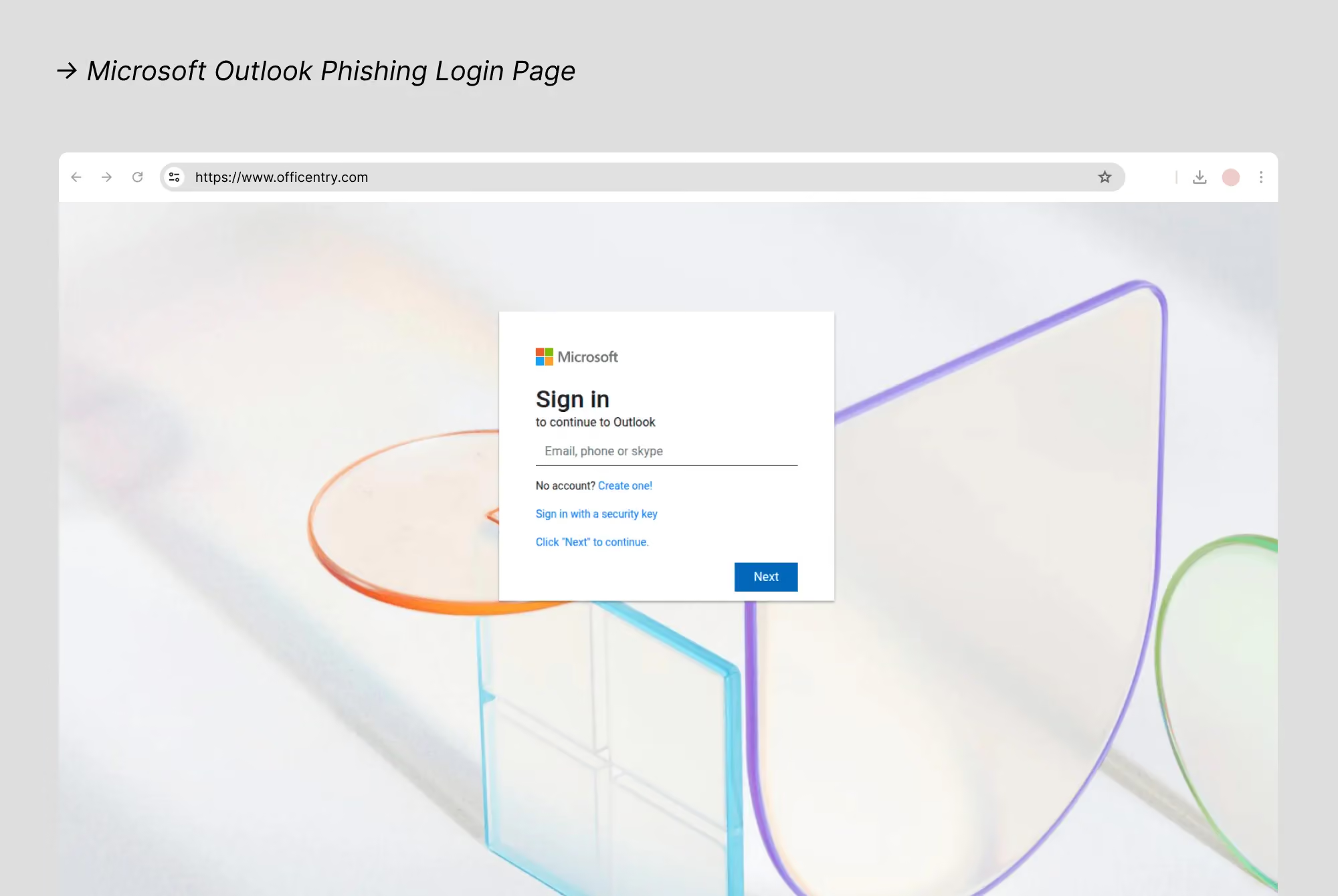
One Microsoft account isn't just one account. It's your Outlook inbox, your OneDrive files, your Teams conversations, and your Microsoft 365 subscription, all behind a single password. That's exactly why attackers keep coming back.
Microsoft held the #1 spot for the third consecutive quarter, and the scam playbook is getting sharper. The three most common attacks we saw in Q2 2026:
- Fake security alerts: Emails claiming "suspicious sign-in detected" with a link to a pixel-perfect lookalike login page designed to harvest your credentials on the spot.
- Billing failure notices: Messages warning your Microsoft 365 payment failed, urging you to "update payment details" immediately.
- Subdomain abuse: Attackers embed "microsoft" or "microsoftonline" into a subdomain of a completely unrelated domain. A URL like `login.microsoftonline.com.office.sibis-office365.mtigroup.myshn.net` looks legitimate at a glance, but it isn't.
In May 2026, the FBI/IC3 issued a PSA warning about Kali365, a Phishing as a Service kit that uses AI generated emails to steal Microsoft 365 access tokens and can bypass multi-factor authentication (MFA) entirely. That's not a future threat. It's active now.
- What to watch for:
- Unexpected security alerts or login warnings
- Billing notices you weren't anticipating
- Login pages that look slightly off
- Any URL where "microsoft" appears in the middle, not at the very start
Guardio flags these lookalike domains in real time, on your browser and on mobile (iOS and Android), before you type a single character.
#2 Steam - when your game library becomes a target
Steam's position at #2 reflects something scammers figured out years ago: a well stocked gaming account is worth hundreds sometimes thousands of dollars. Between rare in game items, a large game library, and Steam Wallet funds, these accounts are prime targets.
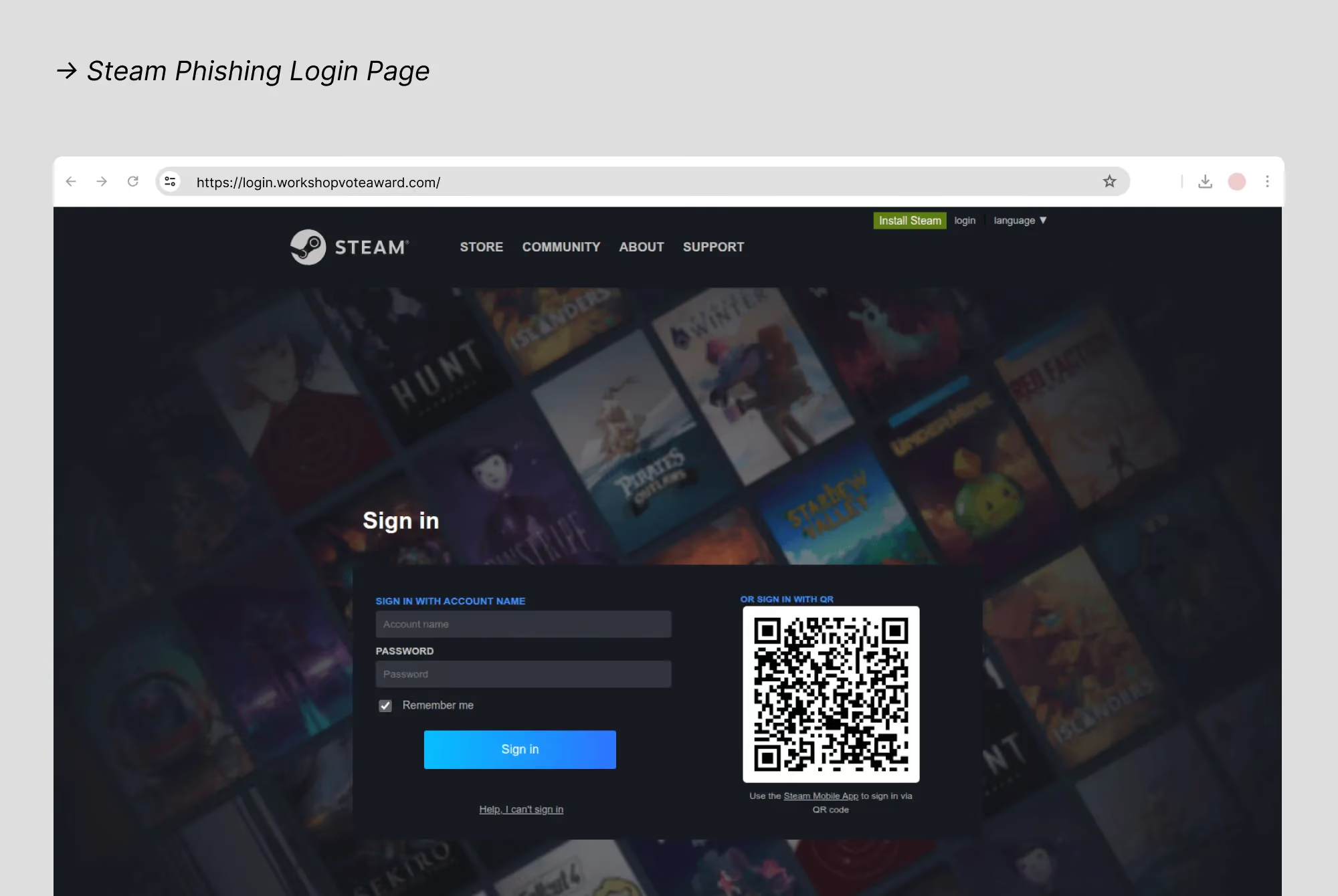
The most common Steam scams in Q2 follow a familiar playbook: a message arrives (often via Discord or Steam chat, sometimes via email) from someone claiming to be a Steam Support representative, a fellow gamer offering a trade, or a stranger alerting you that your account has been flagged. Click the link, enter your credentials on a fake Steam login page, and it's over your account is gone.
Fake giveaways are another major channel: ads or social posts promise free games, Steam gift cards, or rare items in exchange for logging in through a third party link. In June 2026, Valve even discontinued physical Steam gift cards sold in retail stores, citing years of gift card abuse by scammers as a primary driver of the decision.
What to watch for: Any unsolicited offer involving Steam trades, gifts, or support requests. Steam Support will never contact you via chat or ask for your password. Enable Steam Guard (two-factor authentication) and only log in through the official Steam app or steam.com.
#3 Netflix - the streaming scam that goes beyond your password
Netflix phishing isn't really about your streaming account. It's about every other account you use the same password for.
The most common Q2 2026 Netflix scams follow three familiar scripts:
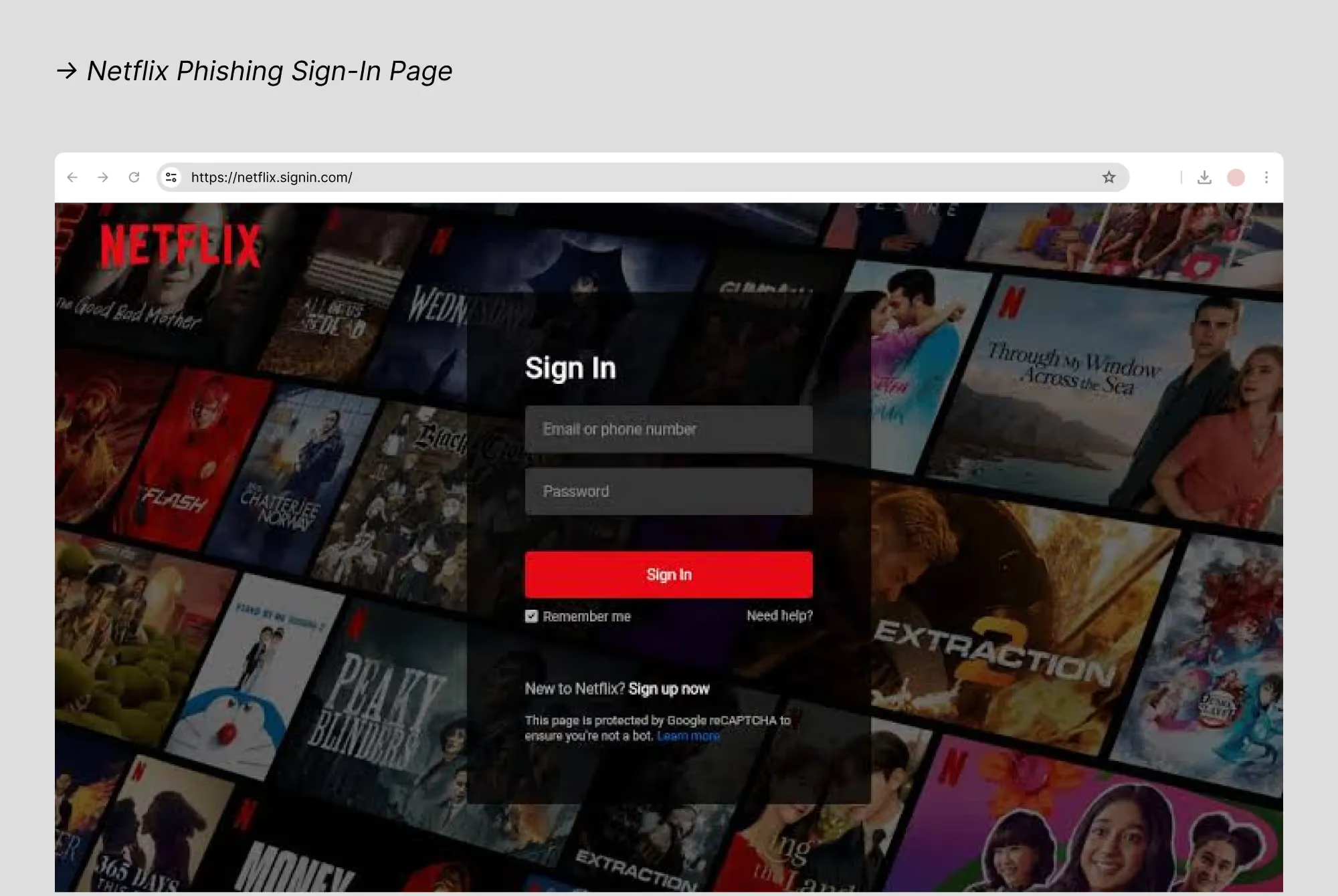
- Fake billing alerts: An email warns your payment failed and your account will be suspended in 24 hours. Urgency kicks in, you click, and a convincing fake login page captures your email, password, and credit card number.
- Fake suspicious sign-in alerts: A message claims someone logged in from an unfamiliar device. You're prompted to "verify your identity" and hand over your credentials in the process.
- Fake reactivation emails: A slick email with a "Reactivate Now" button leads straight to a credential-harvesting page.
Here's the part that stings. As reported in May 2026, attackers don't stop at Netflix. They run stolen credentials through automated tools, testing the same email-and-password combination against banking apps, email accounts, and payment platforms. One phishing click can cascade into a full identity compromise.
- What to watch for:
- Netflix will never ask for your password via email or text
- Always go directly to netflix.com to check your account status, never through a link in an email
#4 WhatsApp - hijacking your conversations without touching your password
Most people assume their WhatsApp is safe as long as nobody knows their password. That assumption is exactly what attackers are counting on.
WhatsApp phishing is uniquely dangerous because the two dominant attack methods seen in Q2 2026 don't require your password at all.
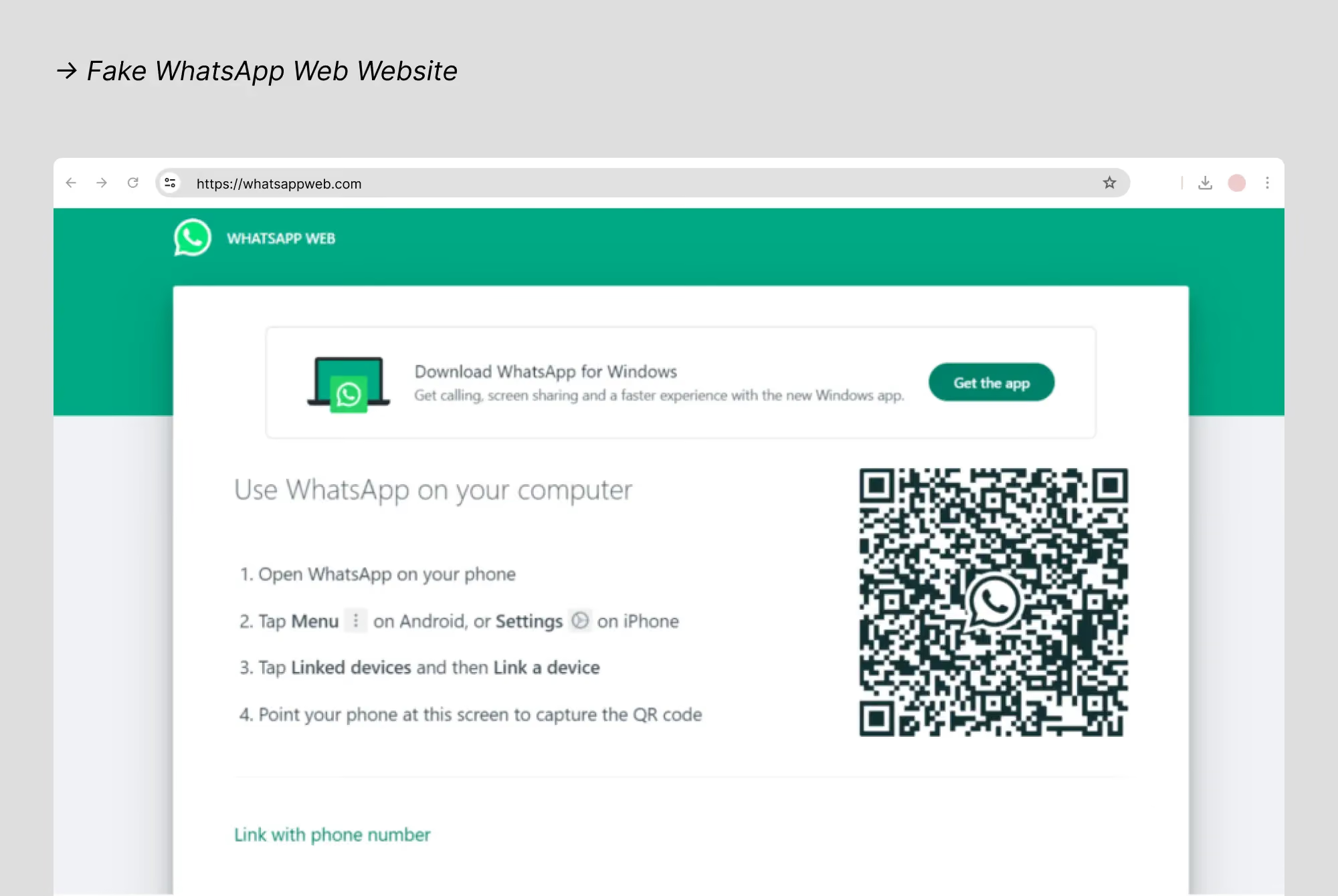
- Method 1: QR code hijacking. Check Point Research identified fake WhatsApp Web login pages, like one hosted at web.whatsapp.app.hl.cn, that look identical to the real thing. When you scan the QR code to "link your device," you're actually adding the attacker's browser as a linked device. They get a live window into every message you send and receive. Silently, with no alert on your end.
- Method 2: Device-linking abuse. As documented by Dutch intelligence agencies in March 2026, attackers trick users into sharing verification or pairing codes that connect an attacker-controlled device to the account. Once in, they can read your private conversations, impersonate you to your contacts, run money-request scams, or spread malicious links through relationships your contacts already trust.
WhatsApp rolled out new linked device alerts in June 2026 to flag suspicious connection attempts, a direct response to this threat.
- What to watch for:
- Never scan a QR code from an unofficial site to "log in" to WhatsApp
- Go to Settings > Linked Devices regularly to see exactly what's connected to your account
- If you get an alert about a new device you don't recognize, reject it immediately
Quarter's biggest story: AccountDumpling - how 30,000 facebook accounts were stolen using google's own email
This is the phishing attack that broke the rules. Most security tools never saw it coming.
In Q2 2026, Guardio Labs uncovered a sophisticated operation called AccountDumpling that sent phishing emails through Google's own infrastructure, meaning every SPF, DKIM, and DMARC check came back clean. Spam filters waved it through. Because technically, Google sent it.
Attackers abused Google AppSheet to send emails from `noreply@appsheet.com` impersonating urgent Facebook policy warnings, complete with fake case numbers and 24-hour deadlines. Targets were Facebook Business account owners and page admins, accounts with real financial value. The operation used Netlify and Vercel-hosted fake Facebook pages to steal passwords, dates of birth, phone numbers, and government issued ID photos, which were then sold through a criminal storefront. Guardio Labs traced the campaign to a Vietnamese-linked actor.
What this means for you
A fully authenticated email proves only that the platform sent it, not that the message is trustworthy. Facebook will never contact you through Google AppSheet. If you receive an urgent copyright or account warning, go directly to Facebook's Help Center and don't click the link. Our protection flagged these pages even when email filters couldn't, because it works at the browser layer, where the phishing page actually loads.
World cup scams: a 320% surge in malicious sites over 4 weeks
The biggest sporting event in history turned out to be the biggest scam opportunity of Q2 2026.
We blocked a 320% increase in malicious World Cup themed websites over four weeks this quarter. That's not a gradual climb. It's a flood. The numbers explain why: the 2026 FIFA World Cup, hosted across 16 cities in the US, Canada, and Mexico, drew over 6 million fans in person and generated 150 million ticket requests in the first 15 days of sales alone. When demand is that extreme and supply is that tight, scammers don't miss the window.
Here's what that scam ecosystem looked like:
- Fake ticket sites: Group-IB identified more than 4,300 fraudulent domains impersonating FIFA's official web presence. Over 13,000 FIFA-themed domains were registered between January and May 2026, and by early May, roughly 1 in 41 was already flagged as suspicious or malicious before a single match was played. Fans paid. They got nothing.
- Crypto scams: TRM Labs detected multiple crypto wallet drainer schemes tied to the tournament, including fake investment platforms using deepfake videos of well-known footballers to push fraudulent "World Cup investment funds."
- Fake merchandise and streaming sites: Counterfeit fan gear shops and fraudulent streaming sites promising "free live broadcasts" were everywhere. These either stole your payment details or pushed malware through a "required" streaming app.
- Fake betting sites: Fraudulent platforms impersonating legitimate bookmakers collected deposits that were never returned.
The tactic that made all of this work? Domain aging. Scammers registered World Cup domains months in advance so those sites would build enough history to slip past reputation based security filters by the time fans were searching for tickets. A site registered in January looks far more trustworthy in June than one registered last week. It's the same playbook used ahead of Amazon Prime Day.
- What to watch for:
- Only buy tickets through FIFA's official site at fifa.com/tickets. No exceptions
- Be skeptical of any social media ad offering tickets, merchandise, or streaming access
- Verify any betting or investment platform is properly licensed before depositing a single dollar
Amazon prime day scam texts: a 500%+ surge starting June 23
The moment Prime Day kicked off on June 23, scammers were ready.
We detected a 500%+ surge in Amazon themed scam and spam texts from that exact date, and it wasn't a surprise. We'd been watching the build up for months. As we flagged in real time on our official @GuardioSecurity account: when millions of shoppers are actively clicking links and expecting delivery updates, this is exactly the environment scammers thrive in.
- The build-up started six months early
Between December 2025 and May 2026, 6,843 new Amazon themed domains were registered worldwide. The peak hit in April 2026, with 1,446 new domains in a single month, a full two months before Prime Day. That timing is deliberate. Attackers "age" domains so they slip past reputation based filters by the time the event goes live. By May 2026, roughly 1 in every 11 new Amazon-themed domains was already classified as malicious or suspicious.
- The scam texts hitting your phone
Here's what these messages actually look like:
- Fake recall/refund texts: "Your recent Amazon order has been recalled. Click here to claim your refund."
- Fake delivery delay texts: "Your package is held. Verify your address" linking to a credential harvesting page.
- Account security texts: "Unusual activity detected. Verify your 2FA code immediately."
- Fake Prime membership alerts: "Your Prime membership is about to be canceled" or "auto-renewed at a higher price."
- Beyond texts: entire fake storefronts
Scammers didn't stop at texts. They built full fake Amazon shopping experiences. One example, amazonashop[.]shop (registered May 2026), copied Amazon's complete marketplace interface, orange branding, category menus, product listings. A separate "amazoncredito" campaign registered 46 domains targeting Latin American shoppers with fake promotional credits, including IDN-encoded variants that displayed as "amazoncrédito" with an accent in browsers, making the spoof far more convincing.
- What's at stake
A stolen Amazon login isn't just an inconvenience. Attackers can place orders using your saved payment methods, harvest stored credit card details, and mine your order history for follow-up scams.
- What to watch for:
- Amazon will never text you asking for your 2FA code or password
- Go directly to amazon.com to check order status, never click a link in a text
- Be especially skeptical of any "limited time" offer that arrives via text during a major sale event
The pattern behind Q2 2026: what scammers are really doing
Step back from the individual stories and one thing becomes clear: none of this was random.
- Pattern 1: They follow your emotions, not the calendar.
Every major Q2 campaign was timed to a specific emotional state. Prime Day created purchase urgency. The World Cup created ticket desperation. AccountDumpling created copyright panic. Scammers don't just watch the news they build campaigns around the exact moments when you're most likely to click before you think. As IRONSCALES noted in June 2026, event-driven phishing is "one of the few threats that RSVPs in advance" attackers registered World Cup domains ten months before kickoff.
- Pattern 2: They're using infrastructure you already trust.
The most effective Q2 attacks didn't come from shady servers in unknown locations. They came from Google AppSheet, Netlify, and Vercel platforms your browser and email filters are trained to trust. That's the point. Legitimate infrastructure passes security checks, loads fast, and looks clean. Standard filters are increasingly blind to attacks riding on trusted platforms, because the platform itself isn't the threat. The page it's hosting is.
- Pattern 3: They're targeting every account with real value.
Crypto wallets (Ledger, Coinbase), game libraries (Steam), and cable accounts (Xfinity) now sit alongside Microsoft and Facebook on the most-imitated list. Wherever you have an account worth stealing financially or socially scammers will show up.
Knowing these patterns is your first line of defense. The third is having protection that works at the browser layer, where phishing pages actually load, rather than relying on email filters alone. Guardio does exactly that, blocking malicious pages in real time across both your desktop browsers and mobile devices before you ever have a chance to hand over your credentials.
5 things you can do right now to protect yourself
Most phishing attacks don't succeed because they're sophisticated. They succeed because they catch you in a hurried, unguarded moment. These five habits stop the vast majority of them cold.
- 1. Go directly to the source.
If you get an email or text about your Microsoft account, Amazon order, Netflix billing, or Facebook security, open a new browser tab and go directly to the official site. Don't click the link in the message. The message is the trap and the site is where the damage happens.
- 2. Check the real address bar.
The URL at the top of your browser is the only one that matters. A login window inside a webpage can display any fake URL it wants. If you're logging into Steam, the real address bar should say store.steampowered.com and not anything else, no matter how convincing the page looks.
- 3. Treat urgency as a red flag.
Legitimate companies don't threaten to permanently delete your account in 24 hours. That pressure is engineered to stop you from thinking clearly. Any message demanding you act right now is designed to short-circuit your judgment. Slow down. The real account will still be there.
- 4. Turn on two-factor authentication (2FA) everywhere.
Even if a scammer steals your password, 2FA adds a third barrier they can't easily cross. Swif's 2026 MFA research found that phishing resistant MFA blocks more than 99% of identity based attacks, even when the attacker already has your credentials. Use an authenticator app rather than SMS where possible, as SMS codes can be intercepted through SIM swapping attacks.
- 5. Add a real-time browser protection layer.
Manual vigilance has limits, especially when scam sites are hosted on legitimate platforms like Google or Netlify. That's exactly what made AccountDumpling so dangerous. The emails came from Google's own infrastructure and passed every standard authentication check. Guardio's browser extension detected and blocked those phishing pages at the browser layer, protecting users before they ever saw a fake login screen. On mobile, Guardio's app extends that same protection to your browsing sessions and incoming texts, catching smishing attempts and scam links before they can do damage. It catches what your inbox and your carrier can't.
Q2 2026 wrap-up: stay ahead of what's coming next
Q2 2026 made one thing clear: scammers don't improvise. They plan.
Microsoft held the top spot for the third consecutive quarter, proving that credential theft is still the most reliable entry point into someone's digital life. Gaming crept into the top rankings with Steam. Crypto phishing matured, with Ledger and Coinbase both making the list. The quarter's two biggest surges, Amazon Prime Day texts and World Cup sites, showed just how precisely attackers time their campaigns around the moments you're most distracted.
Then there was AccountDumpling. Thirty thousand Facebook accounts stolen through Google's own email infrastructure. That one should change how you think about "safe" senders.
- What Q3 is already shaping up to look like:
- Back-to-school season brings a predictable spike in education platform phishing. With the 2026 Canvas breach still fresh, expect scammers to impersonate Google Classroom and Canvas with fake login pages targeting students, parents, and teachers.
- Retail ramp up ahead of fall sales events means more fake order confirmations, shipping alerts, and account suspension texts.
- Crypto phishing tends to spike around market volatility, and scammers are already registering domains for the next wave.
Threats are moving faster than any individual can manually track. The best protection isn't memorizing every scam. It's having a layer of defense that catches what you miss, in real time, before you click.
Guardio's browser extension, mobile app, and identity breach monitoring work quietly in the background, flagging malicious sites, scam texts, and compromised credentials across all your devices, so you don't have to be a security expert to stay safe.
Our Q3 2026 report drops in October. You can start protecting yourself today for free.
Conclusion
Q2 2026 confirmed what we've been tracking for years: scammers follow the calendar, not chance. Microsoft stayed at the top, Steam and crypto platforms climbed the rankings, and two major events drove phishing surges that were anything but spontaneous. Knowing which brands attackers hide behind is the first step. Acting on that knowledge is what actually keeps you safe.
Don't wait for a scam to find you
Guardio's browser extension and mobile app detect and block phishing sites, fake login pages, scam texts, and more in real time before you ever enter your details. Join over 1.5millions people of users who browse and scroll with confidence.
FAQs
Which brand is most imitated in phishing scams in 2026?
According to Guardio Labs' Q2 2026 phishing report, Microsoft is the most imitated brand in phishing scams, holding the #1 spot for the third consecutive quarter. Scammers target Microsoft because a single account often unlocks Outlook, OneDrive, Teams, and Microsoft 365, making stolen credentials extremely valuable. Other top targets include Steam, Netflix, WhatsApp, and Amazon.
What is AccountDumpling and how does it work?
AccountDumpling is a sophisticated phishing operation uncovered by Guardio Labs in Q2 2026 that compromised more than 30,000 Facebook accounts. What makes it unusual is its delivery method: attackers abused Google AppSheet, a legitimate no-code platform, to send phishing emails through Google's own infrastructure (noreply@appsheet.com). Because the emails came from Google, every standard email authentication check, SPF, DKIM, and DMARC, passed, making them nearly impossible to catch. Victims received alarming messages about Facebook policy violations and were directed to fake Facebook Help Center pages that stole their credentials and identity documents.
How can I tell if an Amazon text message is a scam?
Amazon will never text you asking for your password, 2FA code, or payment details. Legitimate Amazon texts about orders or deliveries will never include a link asking you to log in or verify personal information. If you receive a suspicious text claiming to be from Amazon, especially around major sale events like Prime Day, go directly to amazon.com in a new browser tab to check your account status. Do not click any link in the text message. Guardio's browser extension can block known Amazon phishing pages automatically if you do accidentally click a link. Additionally, Guardio's mobile app provides browsing protection on your phone and includes a Text Message Filtering feature for iOS that automatically scans texts from unknown senders and sends potential scam or phishing messages straight to your junk folder.
Are World Cup ticket scams still active after the tournament starts?
Yes. World Cup scams don't stop when the tournament begins. They often intensify. Fake ticket resale sites, fraudulent merchandise stores, and phishing pages impersonating FIFA remain active throughout the event. Scammers also pivot to fake streaming sites, fraudulent betting platforms, and crypto investment schemes using footballer likenesses during the tournament. Only purchase tickets through FIFA's official site (fifa.com/tickets) and be skeptical of any deal offered through social media ads or unsolicited messages.
Can a phishing email really come from a Google address?
Yes, and the AccountDumpling operation is a real-world example of exactly this. Attackers abused Google AppSheet's notification system to send phishing emails from noreply@appsheet.com, a legitimate Google address. The emails passed all standard authentication checks. This is why email security alone is not enough: a green authentication result proves only that the platform sent the email, not that the message itself is trustworthy. Browser-level protection and mobile protection like Guardio's extension can catch the phishing page when it loads, even when the email that delivered the link looked completely legitimate.
How do Steam account phishing scams work?
The most common Steam phishing scam in Q2 2026 used fake FACEIT verification pages (FACEIT is a major competitive gaming platform linked to Steam accounts). Scammers built convincing fake sites on lookalike domains, then presented a fake Steam login window inside the page, a technique called a Browser-in-the-Browser attack. The fake window could display any URL in its address bar, including the real steamcommunity.com address, making it look completely legitimate. Victims who entered their credentials handed over full account access, including games, skins, wallet funds, and saved payment methods. Always check the real browser address bar at the top of your screen, not any login window that appears inside a webpage.


 Phishing Scams
TikTok Shop Scams: Expert Online Shopping Safety Tips


